Powered by Blogger.
Showing posts with label Facebook. Show all posts

Wednesday, 28 August 2013

Now you can “Friend” Someone on Facebook & Hide It From Your Status Updates

0 comments Posted by Imran at 11:13
I’m sure that this has happened to you before. Someone you have ties to, whether it’s a co-worker, your boss, or even worse, a parent, has finally discovered social networking and wants to be your newest Facebook friend.

For me personally, that’s no big deal. I’m fairly open about my online activities. Everything I write, Digg, or otherwise share goes through my Friend Feed to my Twitter then ultimately onto my Facebook (my, that sounds naughty). Besides that, just about everyone I’d consider a co-worker is already on Facebook, and would have little issue about my other Internet activities.


Putting all that aside however, imagine for a moment that I worked at Domino’s Pizza and that I don’t want my boss to know that I just became a fan of Papa John’s (writing this one’s gonna make me hungry). Here’s what I would do to hide Facebook status updates and keep that fact confined to my closer friends:

On your Facebook home page, you should see the ‘Settings’ menu close to the search field on your upper-right. Open that menu and go to ‘Privacy Settings’


On the next page, you’ll have four choices: Profile, Search, News Feed, and Applications. What you’ll want to edit here are your Profile privacy settings.


 By default, everything on your profile is limited to your Friends and your Networks (your first Network is likely your city of residence, but you may have joined more). From the screenshot above, you can see that I’ve limited everything on my profile to my Friends and their Friends. Anyone else who visits my profile will only see that I have a profile, but will not see what’s on it.


You may want to tweak your overall privacy setting here, but what we’re aiming for is the “Except These People” list at the bottom of this dialog. Type out the name of any of your Friends to restrict that person from viewing anything in your Status Updates.

For all you faithful Facebook fans, we’ve got a lot of tips and tricks on how to make the most of the site. If you have any privacy tips or concerns to share, please drop them in a comment. I’m off to order pizza.
Read More »

Thursday, 8 August 2013

How To Send Friends Request On Facebook When You Are Blocked

0 comments Posted by Imran at 01:20
send friends request when blocked
Facebook is an good Social media that keeps us to be in always contact with our Relatives, friends, and Family. Facebook is harsh in their policies, even though it is for connecting the people all over world, it do not encourage the spam or adding strangers. Everyone had faced this problem once in your life , as you friend requests are blocked and you cannot send the friend request


Read this also Some More Tricks About Facebook

The Facebook is using this rule to just secure the people from spam and Make them more comfortable, More over the Pending of larger Facebook requests are the major reason for your ban


send friends request when blocked

Better to clear the Pending friend requests, Now i am going to tell the Steps for sending the friend requests even though you are Blocked


This trick is well working, if you have any problems please comment here and i will solve you........

There Are Two Ways To Send Friends Request On Facebook When You Are Blocked

1. By Adding Personal Contacts
2. By Changing The Date

1. By Adding Personal Contacts


When you are trying to add an friend, you need the Email address of the Person whom you are going to add.

There are two ways to get the Email id of the Person


  • by his/her Profile
  • by any other ways

2) When you want more friends, better to create a Contact file

3) The Easy way to Create a Contact file


  • Create an new text document in notepad
  • Now add the Email addresses separated by comma (,)
  • Save this file with the Extension .vcf
  • The saved file is your Contact File


4) Upload your contact file by going to this link , after opening this link there are so many options, at the bottom we can see Other Tools


send friends request when blocked

  • Click the Other Tools and you will find the Option to Upload your File

5) Click "OK" when you are done with your work.

2. By Changing The Date


1. click on the time at the bottom of you pc desktop

2. click on change date and time settings

3. Again Click on change date and time. . .

4. change the date according to the blocked date-  Means like its 8-8-2013 and you are blocked for 2 days then change your pc date to 11-8-2013. . .

5. Press Ok and you are DONE. . .

Thanks for reading my article, if you like this article please subscribe to my blog and get the regular updates ................


Read More »

Saturday, 27 July 2013

How To Schedule A Futured Post To Appear On Facebook Page Later

0 comments Posted by Imran at 03:49

Now a days facebook is very fast growing social network among the all social networking sites and facebook page posting is now a very good and interested job of all facebook users, but it is very difficult to post very time, because posting on facebook pages helps in increasing the page likes, a page owner must post a image or a text status in very 1 hour if he/she is interested to increase his facebook pages likes quickly but its not possible that a page owner login in every hour to post a single or multiple status, and sometimes Internet connection also shuts of or very slow to post or even open facebook page, therefore facebook announces a good option for page owners to post on there behalf even when they are not loged in or either there internet connection is not on the go.
You can prepare a post and schedule it to appear later by adding a date and time in the future before you post it. You can schedule a post up to 1 Year in advance in 10-minute intervals.
From your Page's sharing tool:
  1. Choose the type of post you want to add to your Page
  2. Click the  icon in the lower-left of the sharing tool
  3. Choose the future year, month, day, hour and minute when you'd like your post to appear
  4. Click Schedule
If you choose a date in the past, the post will appear immediately at the appropriate place on your Page's timeline. All times correspond to the current time zone you're in.
If you have a smartphone, you can create an offer from the Pages Manager App.

iphone or ipad

To schedule a post:
  1. Choose the type of post you want to add to your Page
  2. Tapin the lower-left corner and select the date and time you'd like your post to appear
  3. Tap Schedule > Post
You can view and manage your scheduled posts by tapping on Filter in the top right corner.
Android phone
To schedule a post:
  1. Choose the type of post you want to add to your Page
  2. Tapin the lower-left corner
  3. Select the date and time you'd like your post to appear and tap Schedule
  4. Tap Schedule at the top right corner
You can view and manage your scheduled posts by tapping on Filter in the top right corner.

What is Pages Manager?

Pages Manager is an application that lets admins check on their Page activity, view insights and respond to their audience from their mobile device.
Download the Pages Manager app:
Read More »

Thursday, 13 June 2013

How To Safe Your Facebook Account From Hacking By Social Engineering

0 comments Posted by Imran at 00:38
Safe From Social Engineering
Hacking a Facebook account is truly impossible now after Facebook have improved their Security and closed almost all type of Exploits that have been found by Hackers. But social engineering is only the trick which facebook are any other social media network like twitter can't close, I'm going to show in this article, a Penetration Trick that cannot be and will not be closed by Facebook (or any other Social Network) and the way to be safe from this kind of hacking (social engineering). This trick consists of a Social Engineering Penetration Hack. We will see what it means and how it works in this step by step Tutorial.


What is Social Engineering Hacking?


Social Engineering is a penetration method that hacker uses to access personal and secure information, by having some knowledge about the victim or by tricking and convincing the victim into giving him some useful and important things, those things can be the Answer of the Security Question of his Online Account. Having the Security question's answer will help a lot in hacking the Facebook account.

If i simply define social engineering then it is the method to make victim fool. . .


Why Facebook is Weak against Social Engineering Hack?


Like we said, Social Engineering help you find very important and secure information about the victim like having the answer of the Security Question, which totally make Facebook kneel down against this trick, because the security question cannot be changed after creating the account, which make it totally breakable with social engineering. Any other social network website like twitter, is also weak facing Social engineering.

What Hackers Require To Hack Facebook Account Using Social Engineering


Social Engineering on Facebook can be performed by using No Tool, Programs or Software, the Only thing that are required are: a Smart brain OR Some knowledge about the victim. As i told you before that its just the method to make the victim fool. . .


How To Be Safe From Social Engineering


Hackers use their mind to ask you your security question by the flirt are something else, no matter the hacher is your friend are your enemy or your stranger etc, if someone ask your personal info then you have to be sure that is the safe to tell him/her your personal info. . . As i told you before that once you enter your security question you can't able to change it again, but if you are going to create your new account on facebook then two things i wanna tell you to be safe from social engineering. . .

1. what ever your security question is make sure its answare not to be true

yes whatever your security question is, it is possible that your family member or your best friend know that so make sure the answare of your security question is the one that know only you. . .


A good security question will have the following characteristics:


1.  Easy to remember, even 5 or 10 yrs from now
2.  At least thousands of possible answers
3.  Not a question you would answer on facebook, myspace, in a "Fun Questions to Ask" survey, or in a article or interview
4.  Simple one or two word answer
5.  Never changes

2. Don't use Security question if you believe that your Email is protected


if you don't use your securiy question then it is good enough, if hackers want to hack your account they are unable to go after recovery method of email or mobile notification, and if your email is protected like gmail allows user to be safe using mobile message notification then its good to not enter your security question, then its only ask hacker to recover your facebook account using email address that hacker can't. . .


Read More »

Saturday, 16 March 2013

New Facebook Pop Up Like Box For Blogger 2013 With Timer

0 comments Posted by Imran at 06:25
Today we are sharing New And lite version with much control options. This one includes a time counter and instead of likebox it displays a like button that links to your Fan Page and an attractive Image that also links to your fan page letting your visitors to either join your fan page by clicking the like button or by simply visiting your fan page by clicking the image. You can set for how long the widget/plugin must display before disappearing automatically. It also includes a close option.
You can also specify whether you want it to show immediately as soon as a visitor enters your site or after a specified time. we simply modified the code to create four different backgrounds for the likebox. The installation is extremely easy just follow these steps. This one comparatively loads faster.


Important Note: Some of Templates Does Not Support PopUpBox Close Option.
I saw some of blogs are using timeout of 1000 & above seconds plz dont use this, because you will loose  your blog traffic, better use timeout : 10 or 20 second because visitors dont want to wait!!! 

How To Add Facebook Like Box To The Blogger With Timer


Go To Blogger > Design > Edit HTML
Backup your template
Paste the following code just above </body>

<!-- itwebister.blogspot.Com New Facebook Pop Up Like Box For Blogger 2013 With Timer Start -->
<script type='text/javascript'>
//<![CDATA[
KNFBFansPRO='ITWebister'
//]]>
</script>
<style>
#fblikepop{background-color:#fff;display:none;position:fixed;top:200px;_position:absolute; /* hack for IE 8*/width:450px;border:10px solid #900000;z-index:200;-moz-border-radius: 9px;-webkit-border-radius:

9px;margin:0pt;padding:0pt;color:#900000;text-align:left;font-family:arial,sans-serif;font-size:13px;
}
#fblikepop body{background:#FFF none repeat scroll 0%;line-height:1;margin:0pt;height:100%;
}
.fbflush{cursor:pointer;font-size:11px !important;color:#FFF !important;text-decoration:none !important;border:0 !important;
}
#fblikebg{display:none;position:fixed;_position:absolute; /* hack for IE 8*/height:100%;width:100%;top:0;left:0;background:#000000;z-index:100;
}
#fblikepop #closeable{float:right;margin:7px 15px 0 0;
}
#fblikepop h1{background:#900000 none repeat scroll 0 0;border-top:1px solid #900000;border-left:1px solid #900000;border-right:1px solid #900000;color:#FFFFFF !important;font-size:14px !important;font-

weight:normal !important;padding:5px !important;margin:0 !important;font-family:"Lucida Sans Unicode", "Lucida Grande", sans-serif !important;
}
#fblikepop #actionHolder{height:65px;overflow:hidden;}
#fblikepop #buttonArea{background:#FFFFFF;border-top:1px solid #9000000;padding:10px;minCCCCCCght:50px;
}
#fblikepop #buttonArea a{color:#999999 !important;text-decoration:none !important;border:0 !important;font-size:10px !important;
}
#fblikepop #buttonArea a:hover {color:#900000 !important;text-decoration:none !important;border:0 !important;
}
#fblikepop #popupMessage{font-size:12px !important;font-weight:normal !important;line-height:22px;padding:8px;background:#333 !important;
}
#fblikepop #counter-display{float:right;font-size:11px !important;font-weight:normal !important;margin:5px 0 0 0;text-align:right;line-height:16px;
}
</style>

<script type='text/javascript' src='https://sites.google.com/site/mmktricks/jquery.js'></script>

<script type='text/javascript' src='http://connect.facebook.net/en_US/all.js#xfbml=1'></script>


<script type='text/javascript' src='https://sites.google.com/site/itwebister/FBpopout.js'></script>


<script language='javascript'>
//<![CDATA[
$(document).ready(function(){
$().KNFBFansPRO({
timeout: 20,
wait: 0,
url: 'http://www.facebook.com/itwebister',
closeable: true });
});
//]]>
</script>
<div id='fbtpdiv'></div>
<!-- itwebister.blogspot.Com New Facebook Pop Up Like Box For Blogger 2013 With Timer End -->
 Make these important changes:
 
Replace this ITWebister with your Facebook username.
The timer is set to 20 seconds to change it simply edit timeout: 20
The widget appears immediately after a visiter eneters. If you want it to appear after one minute or more then edit wait: 0
Read More »

Thursday, 10 January 2013

How To Protect Your Facebook Account With Login Approval

0 comments Posted by Imran at 00:16
Facebook Login Approval
Now a days hacking is spreading every where, Now In 2013 Hacking is growing very very fastly, in this case no one is safe in online world, no ones privacy is private in 2013, so all the companies and users as well are going to learn about anti-hacking, or about the way to be defended from such a brilliant hackers, well this is not my topic, here i am going to teach you the way of to be defended from facebook hackers. . .


With a cell phone and a little patience, you can make life a lot more difficult for anyone trying to hack into your Facebook account.

The trick: Facebook’s “login approvals” feature, which adds an extra level of security whenever you or anyone else attempts to log into your Facebook profile from an unknown computer or device.

First, a little background.

Facebook keeps track of all the PCs, Macs, phones and other devices used to access your account.

Indeed, you can view all the “recognized” devices that have logged into your account from your Facebook security panel, and you can also opt to get an alert whenever someone tries to log into your account from a new computer or device. (Here’s how, by the way.)

Want to take your Facebook security one step further? Here’s where “login approvals” come in.


Once you turn on the “login approvals” feature, Facebook will demand a six-digit code if you or anyone else tries to log in to your account from an “unrecognized” computer or mobile device.
Now, this six-digit code isn’t another password you’d need to memorize.

Instead, whenever you need a verification code, Facebook will send it to your cell phone via text message—and yes, it’ll be different every time. (That’s why the expired code shown in the photo above won’t do anyone much good.)

Plug in the code, and you’ll be granted access to your account. Also, Facebook will add the computer or handheld you’re using to your list of “recognized” devices.

No code? Then no access to your account, even for hackers who’ve managed to get your Facebook username and password.

OK, so what happens if you can’t get a cellular signal, or if you lose your phone? In that case, you’ll be blocked from your account until you log in from a recognized computer or device.

Sound like a hassle? Maybe so—but personally, I’d rather type in the occasional verification code than get my Facebook account hacked.


Here’s how to turn login approvals on…


  • Click the little downward arrow in the top-right corner of any Facebook page, then select Account Settings.

  • In the left column of the following page, click the Security tab, then click the little “Edit” link to the right of the “Login Approvals” section.

  • Check the box marked “Require me to enter a security code each time an unrecognized computer or device tries to access my account.” When you do, a window will pop up with more information about login approvals and a Set Up Now button. Click the button, then confirm your cell phone number. (If you don’t already have a mobile number connected to your Facebook account, you’ll be prompted to add one.)

  • Facebook will send a text with a confirmation code to your cell phone. Go ahead and copy that code into the prompt that appears.

  • All set? If so, you’re done.


Read More »

Thursday, 3 January 2013

All About Facebook Security

2 comments Posted by Imran at 06:10
Facebook Security Tips
I read in a magzine about 10 days ago, that cybercrimes will be increase about 60% in the year 2013, And in the beginning of the year the PTCL site had hacked today, and my facebook account also hacked today, i recover that, i will also share much more tricks about recovering facebook account and about Anti-Hacking, here i am writting some common facebook security tips - must read it is most usuable tips by hacker. . .


What You Have To Do To Keep Your Account Secure?


Think before you click.


Never click suspicious links — even if they come from a friend or a company you know. This includes links sent on Facebook (ex: in a chat or post) and links sent in emails. If one of your friends clicks on spam by accident, that link might be sent to all of their Facebook friends. Remember to never re-enter your Facebook password or download something (ex: a .exe file) if you aren’t sure what it is. If you're asked to re-enter your password on Facebook (ex: you're making changes to your account settings) check to make sure the address of the page still has facebook.com/ in the URL.


If you don’t know what it is, don’t paste it into your internet address bar.


Pasting unfamiliar text into your address bar could result in events and pages being created from your account or other spammy actions.


Pick a unique, strong password.


Use combinations of at least six letters, numbers and punctuation marks; don’t use words that can be found in the dictionary. When in doubt, change your password. You can reset your password by going to your Account Settings page, located in the Account dropdown menu at the top of every Facebook page.


Never give out your username or password.


Never share your login credentials (ex: email address and password) for any reason. Individuals, pages or groups that ask for your login information in exchange for discounted goods (ex: free poker chips) shouldn’t be trusted. These types of deals are carried out by cybercriminals and are in violation of Facebook’s Payment Terms


Log in at www.facebook.com.


Sometimes scammers will set up a fake page to look like a Facebook login page, hoping to get you to enter your email address and password. Make sure you check the page's URL (web address) before you enter your login information. When in doubt, you can always type "facebook.com" into your browser to get back to the real Facebook site.


Update your browser (ex: Internet Explorer).


Current versions of Firefox and Internet Explorer have built in security protection, like warning you if you navigate to a suspected phishing site. So update your Browser. . .


Run anti-virus software


To protect yourself from viruses and malware. You can learn more and download this software for free here:

    For Windows
    For Mac OS


Very soon i will post another tip about Anti-Hacking, so stay tuned :)
and share such kind of informations to to your friends, and help us by talking about ITWebister site on famous Forums like Engrz.com, Itdunya.com, Ittaleem.com, Itqalam.com, etc, to grow our service
Read More »

Friday, 21 December 2012

Rockmelt Browser Free Download Full Version

0 comments Posted by Imran at 12:29
Facebook fanatics should check out RockMelt, a free Web browser that integrates Facebook in its features and interface. It's based on the same open-source browser kernel as Google Chrome, so it's fast and versatile. RockMelt displays your friends, services, and other Facebook features right inside its interface. It's incredibly easy to share stuff with friends, too. While RockMelt works perfectly well as an everyday browser, it's specially configured for Facebook users, and its integrated features may be less appealing to others.


Information


Rockmelt was built on Google's Chromium browser framework (so the browser looks and acts a lot like Chrome), but it's designed to appeal to social media fanatics. You have to sign in through Facebook to use most of its features. But fear not-- while RockMelt collects data on your browsing habits, developers say they won't share that data with any third parties -including Google and Facebook.

RockMelt is a free social mediaweb browser developed by Tim Howes and Eric Vishria. The project is backed by Netscape founder Marc Andreessen. RockMelt integrates a technique for surfing the web that focuses on Google Search and social media, in particular Facebook and Twitter.

The browser was launched in private beta on November 8, 2010 and now it is in the public version beta. Until March 2011, users were required to connect their Facebook account to the website in order to download it. RockMelt supportsWindows and Mac OS X platforms.

RockMelt is based on Google's open-source project Chromium, now on version 18. This is a cross-platform family of browsers that use the open-source web layout engine WebKit — jointly built by Apple, Google, and the open-source community—but have the JavaScript engine replaced by Google's own V8, also open-source.


About


 What fans love about RockMelt will undoubtedly drive some people crazy. On the right side of the browser window, you'll see a thin strip with your Facebook friends' icons and notifications about whether they're available to chat. By clicking your friend's icon, you can chat in the browser window without having to switch back and forth between Facebook and your other tabs. On the left side of the browser window, you can choose "apps" for different Web sites that show notifications when new content has been posted. Sometimes, though, the information at the edges of the browser window can get distracting. When that happens, you can hide the information by clicking on the bell icon in the top right corner to silence the visual noise.

There are some other drawbacks to RockMelt as well. Any link you click on in the left hand bar (such as a link from RockMelt's CNN app) will be added to your Facebook timeline unless you turn the behavior off in the browser preferences. Also, many of the extensions that work in Google's Chrome don't work in RockMelt. RockMelt CEO Eric Vishria says the company is continuously working with developers of good Google Chrome apps to make versions of the apps that are compatible in RockMelt as well. He says today there are about 200 extensions for RockMelt.

Overall, the fledgling browser works really quickly. It did an even better job than Chrome at processing HTML5, coming in third after Firefox and IE9, and RockMelt took second in our JavaScript benchmark--scoring slightly lower than the winning Chrome. And it loaded our static, image-heavy page in a lightning-fast 4.15 seconds, second only to Opera.


Screen Shots


Download


Read More »

Monday, 17 December 2012

Learn: How to Download Facebook Photo Albums

0 comments Posted by Imran at 12:55
Download Facebook Album(s)
Many people like to download Facebook photo album of there friends or any facebook page and they download them one by one but it is so difficult and time wasting to download photos one by one, here i am going to solve your problem of downloading photo albums without wasting of your time


1. Go to this Firefox App

2. Install it, and restart firefox

3. And You Are Done!!!!! Yes Really YOU ARE DONE :)

To use this add-on, simply right click in the Album and click "Download Facebook album(s)". You can do this in a single album, or a "Photos of You", or a "Photos" page. Also, you can download multiple albums from a user at once by doing this on the user's "Albums" page. You can even download videos in albums just like photos.

Download Facebook Photo Albums

Read More »

Sunday, 16 December 2012

How to Place Facebook Chat On Firefox Sidebar

0 comments Posted by Imran at 03:43
Facebook Chat is cool, at least it allows you to send instant messages to online Facebook contacts. However I’m not really a fan of the chat bar being at the bottom of the page, what if I’ve left Facebook but still wants to remain chatting with my Facebook contacts? If you are using Firefox, you can place the Facebook Chat at the sidebar.


 Your Facebook Chat In Sidebar will Look Like This. . .


Step 1


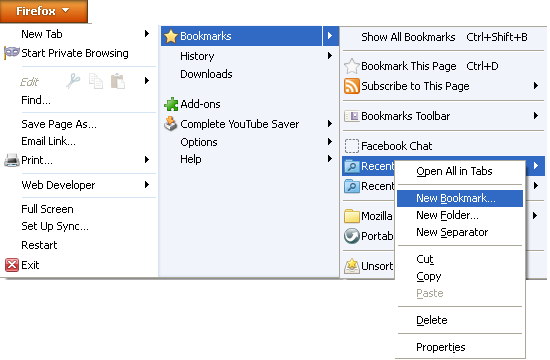
Go To > Firefox > BookMarks > Recentlty BookMarks

right Click On It and Click On new BOOKMARK as shown in picture below


Step 2


After Clicking On New Bookmark...

Enter The Following

  • Name: Facebook Chat
  • Location: http://www.facebook.com/presence/popout.php
  • Check Load this bookmark in sidebar.


Step 3


Launch The Facebook Chat Bookmark and start chating with your facebook contacts within firefox.


You Are Done
Read More »

Tuesday, 11 December 2012

How To Update Facebook Status Using Mobile Phone For FREE

0 comments Posted by Imran at 00:27
Now A days Every one wanna to update his/her Facebook wall but its so difficult to stay 24 hourse a day online or its difficult to post your Mobile SMS like jokes, quotes, stories. . . etc, whenever you want, because you have to write your mobile content in FB, But Now ITWebister is Going to Finish your trouble. Now You can Update your Facebook wall posts Using Your Mobile Phone For FREE. . .


What Is Brain SMS Poster


SMS Poster allows you to post text on your Facebook Profile by SMS.Developed by Brain Telecommunication Ltd.


Procedure


1. First Of All Go To Brain SMS Poster

2. Now Click On Allow Brain SMS Poster


3. Now Click On "Go To APP"


4. Allow Permissions


5. Update Your Mobile Number from which you will send SMS

6. Congratulations ...your data updated successfully.

You Will Recieve A Confirmation SMS

7. Save That Number And WhenEver You Send SMS on That number your sms will be posted on your Facebook Wall


8. Your Number Look Like is "92-331-4341500"

9. Click On Home For Futher Options Like

* Send me SMS when my friends like my SMS Post   
* Send me SMS when some one comments on my Post   
* Send me SMS alert on my friend's Birthday   
* Send me SMS alert one day before my friend's Birthday   
* Send me SMS alert for my friend's birthdays this month


And You Are Done

Your Turn


If You Like This Article Comment Bellow And Share This With All Your Facebook Friends


Read More »

Wednesday, 5 December 2012

New Emoticons Codes for Facebook Chat

0 comments Posted by Imran at 00:59
Facebook Emotions Codes
For our fans & followers, this is a list of New codes for Facebook Chat (Smileys/Emoticons/Words/Icons...) to make the chatting more funnier. We already shared many Secret Smileys Codes you can use it & share it with friends. This trick works 100% generated with a converter, all you have to do is to Paste the Code inside Facebook Chat Box and send it. And Your Are Done!


 New Emoticons Codes for Facebook Chat


1. Gangnam Style


Gangnam Style


[[294227474013628]][[294227480680294]][[294227477346961]][[294227484013627]][[294227487346960]]
[[294227550680287]][[294227554013620]][[294227560680286]][[294227564013619]][[294227557346953]]
[[294227657346943]][[294227647346944]][[294227650680277]][[294227654013610]][[294227644013611]]
[[294227737346935]][[294227734013602]][[294227740680268]][[294227744013601]][[294227747346934]]
[[294227820680260]][[294227817346927]][[294227810680261]][[294227814013594]][[294227807346928]]

2. Dr House


Dr House


[[182796381857532]][[182796368524200]][[182796371857533]][[182796378524199]]
[[182796375190866]][[182796441857526]][[182796448524192]][[182796438524193]]
[[182796451857525]][[182796445190859]][[182796518524185]][[182796515190852]]
[[182796521857518]][[182796508524186]][[182796511857519]][[182796578524179]]
[[182796581857512]][[182796585190845]][[182796591857511]][[182796588524178]]


3. So What ?!


So What


[[487707001259892]][[487707004593225]][[487706991259893]][[487706994593226]][[487706997926559]][[487707084593217]][[487707091259883]][[487707094593216]][[487707087926550]]
[[487707081259884]][[487707174593208]][[487707181259874]][[487707177926541]][[487707184593207]][[487707187926540]][[487707257926533]][[487707254593200]][[487707264593199]]
[[487707261259866]][[487707267926532]][[487707351259857]][[487707357926523]][[487707361259856]][[487707354593190]][[487707347926524]][[487707437926515]][[487707441259848]]
[[487707444593181]][[487707451259847]][[487707447926514]][[487707547926504]][[487707551259837]][[487707544593171]][[487707541259838]][[487707557926503]][[487707631259829]]


4. Wiki, Twitter, Facebook : WTF!


Wiki, Twitter, Facebook : WTF!


[[283717828397926]][[283717838397925]][[283717835064592]][[283717841731258]][[283717845064591]][[283717905064585]][[283717911731251]][[283717915064584]][[283717908397918]][[283717918397917]]
[[283718008397908]][[283718015064574]][[283718018397907]][[283718011731241]][[283718005064575]][[283718091731233]][[283718095064566]][[283718098397899]][[283718101731232]][[283718088397900]]
[[283718605064515]][[283718608397848]][[283718611731181]][[283718601731182]][[283718615064514]][[283718681731174]][[283718685064507]][[283718678397841]][[283718688397840]][[283718691731173]]
[[283718765064499]][[283718758397833]][[283718768397832]][[283718761731166]][[283718755064500]][[283718848397824]][[283718841731158]][[283718845064491]][[283718851731157]][[283718855064490]]


5. Bullets on Screen:


Bullets on Screen


[[371435409616395]][[371435412949728]][[371435422949727]][[371435419616394]][[371435416283061]][[371435496283053]][[371435499616386]]
[[371435492949720]][[371435489616387]][[371435502949719]][[371435576283045]][[371435586283044]][[371435579616378]][[371435572949712]]
[[371435582949711]][[371435656283037]][[371435666283036]][[371435652949704]][[371435659616370]][[371435662949703]][[371435756283027]]
[[371435752949694]][[371435742949695]][[371435749616361]][[371435746283028]][[371435836283019]][[371435832949686]][[371435829616353]]


6. You Talkin' to Me?


You Talkin' to Me?


[[304973562942331]][[304973559608998]][[304973556275665]][[304973549608999]][[304973552942332]][[304973642942323]]
[[304973646275656]][[304973632942324]][[304973639608990]][[304973636275657]][[304973752942312]][[304973749608979]]
[[304973742942313]][[304973756275645]][[304973746275646]][[304973822942305]][[304973836275637]][[304973832942304]]
[[304973826275638]][[304973829608971]][[304973929608961]][[304973936275627]][[304973926275628]][[304973932942294]]


7. Jim Morrisson :


Jim Morrisson


[[304980352941652]][[304980346274986]][[304980349608319]][[304980356274985]][[304980359608318]]
[[304980506274970]][[304980492941638]][[304980496274971]][[304980502941637]][[304980489608305]]
[[304980662941621]][[304980659608288]][[304980656274955]][[304980669608287]][[304980676274953]]
[[304980839608270]][[304980832941604]][[304980836274937]][[304980846274936]][[304980842941603]]
[[304981012941586]][[304981009608253]][[304981019608252]][[304981016274919]][[304981022941585]]


8. Bob Marley :


Bob Marley


[[487718844592041]][[487718834592042]][[487718841258708]][[487718847925374]]
[[487718837925375]][[487718914592034]][[487718917925367]][[487718924592033]]
[[487718911258701]][[487718921258700]][[487719007925358]][[487719014592024]]
[[487719017925357]][[487719011258691]][[487719021258690]][[487719094592016]]
[[487719097925349]][[487719101258682]][[487719107925348]][[487719104592015]]


9. Johnny Depp (Jack Sparrow):


Johnny Depp


[[297246943711681]][[297246940378348]][[297246953711680]][[297246950378347]]
[[297246947045014]][[297247027045006]][[297247023711673]][[297247033711672]]
[[297247030378339]][[297247037045005]][[297247127044996]][[297247120378330]]
[[297247117044997]][[297247113711664]][[297247123711663]][[297247197044989]]
[[297247203711655]][[297247207044988]][[297247210378321]][[297247200378322]]


10. Good Night & Sweet Dreams


Good Night & Sweet Dreams


[[487727011257891]][[487727017924557]][[487727014591224]][[487727004591225]][[487727007924558]][[487727081257884]][[487727084591217]][[487727074591218]]
[[487727087924550]][[487727077924551]][[487727157924543]][[487727164591209]][[487727161257876]][[487727154591210]][[487727151257877]][[487727227924536]]
[[487727231257869]][[487727234591202]][[487727224591203]][[487727221257870]][[487727297924529]][[487727307924528]][[487727311257861]][[487727301257862]]
[[487727304591195]][[487727394591186]][[487727397924519]][[487727401257852]][[487727404591185]][[487727407924518]][[487727474591178]][[487727471257845]]


11. Talk to Hand :


Talk to Hand

[[283735885062787]][[283735888396120]][[283735891729453]][[283735895062786]][[283735881729454]]
[[283735968396112]][[283735965062779]][[283735958396113]][[283735961729446]][[283735955062780]]
[[283736048396104]][[283736038396105]][[283736045062771]][[283736041729438]][[283736051729437]]
[[283736125062763]][[283736135062762]][[283736121729430]][[283736128396096]][[283736131729429]]
[[283736208396088]][[283736211729421]][[283736201729422]][[283736198396089]][[283736205062755]]


12. You are Beautiful:


You are Beautiful

[[283705248399184]][[283705258399183]][[283705255065850]][[283705245065851]][[283705251732517]][[283705315065844]][[283705318399177]]
[[283705325065843]][[283705328399176]][[283705321732510]][[283705398399169]][[283705405065835]][[283705395065836]][[283705391732503]]
[[283705401732502]][[283705485065827]][[283705475065828]][[283705481732494]][[283705478399161]][[283705488399160]][[283705565065819]]
[[283705568399152]][[283705558399153]][[283705571732485]][[283705561732486]][[283705648399144]][[283705645065811]][[283705641732478]]


13. Thank you!


Thank you

[[475121499197688]][[475121502531021]][[475121492531022]][[475121489197689]][[475121495864355]]
[[475121579197680]][[475121572531014]][[475121569197681]][[475121575864347]][[475121582531013]]
[[475121655864339]][[475121659197672]][[475121665864338]][[475121669197671]][[475121662531005]]
[[475121745864330]][[475121742530997]][[475121755864329]][[475121752530996]][[475121749197663]]
[[475121849197653]][[475121845864320]][[475121852530986]][[475121842530987]][[475121839197654]]


14. Peace Logo:


Peace Logo

[[283736771729365]][[283736765062699]][[283736758396033]][[283736768396032]][[283736761729366]]
[[283736845062691]][[283736841729358]][[283736848396024]][[283736838396025]][[283736851729357]]
[[283736915062684]][[283736921729350]][[283736911729351]][[283736925062683]][[283736918396017]]
[[283737001729342]][[283736998396009]][[283736995062676]][[283736988396010]][[283737005062675]]
[[283737085062667]][[283737075062668]][[283737078396001]][[283737081729334]][[283737071729335]]


15. Butterflies on Hand:


Butterflies on Hand

[[475160219193816]][[475160222527149]][[475160209193817]][[475160215860483]][[475160212527150]]
[[475160285860476]][[475160299193808]][[475160292527142]][[475160295860475]][[475160289193809]]
[[475160369193801]][[475160372527134]][[475160365860468]][[475160375860467]][[475160379193800]]
[[475160445860460]][[475160449193793]][[475160452527126]][[475160455860459]][[475160442527127]]
[[475160532527118]][[475160529193785]][[475160539193784]][[475160535860451]][[475160542527117]]


Read More »

Thursday, 8 November 2012

How to Login to Multiple Facebook Accounts with Google Chrome

0 comments Posted by Imran at 00:26
You need sometimes to open multiple facebook accounts in the same time, so you use different Web Browsers or you Logout from your first account and login to your second account. This method will show you How to Login to Multiple Facebook Accounts at Once using Only Google Chrome.


Learn: How to Login to Multiple Facebook Accounts with Google Chrome


1) Login to your First Facebook Account as always.

2) Now Click the Wrench to bring Google Chrome options, and Click New incognito window (or Press Ctrl+Shift+N)
3) By clicking New incognito window it will bring you a new private window that stores all cookies apart (cookie don't collapse with the first account's cookie) You'll notice a secret agent in the top left corner of Google Chrome.


4) Go to Facebook.com in the new private window, and Login to your second account as always.
NB: This method works also for: Gmail, Hotmail, Yahoo Mail, Twitter and many other accounting websites.

Read More »

Wednesday, 7 November 2012

How to Find Who Deleted you On Facebook

0 comments Posted by Imran at 23:20
unfriend finder
Edouard Gatouillat is geek hacker who have developed a new Browser plugin script that shows you who have deleted / Unfriend you on Facebook. This script is called Unfriend Finder, it keeps tracking and monitoring your friends list and notify you whenever a Friend have been disappeared since your last login. This is not a Spam and actually works on any Web Browser ( Google Chrome, Mozilla Firefox ...).


How to Find Who Deleted you On Facebook 

1) Download & Install this Extension Unfriend Finder (works for all browsers)

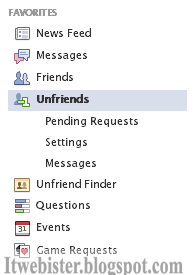
2) Now a new tab will appear in the left side of Facebook homepage :
left unfriend tab
3) And in the Top header of Facebook :

unfriend header
4) Now, whenever a friend have unfriend you from his list, you'll get notified in 3 ways:

. You'll receive a simple notification.
. You'll get notified on the left side (step2)
. You'll be notified on the top header (step3)

unfriend notification


Read More »
 

Popular Posts

© 2011. All Rights Reserved | ITWebister | Template by Blogger Widgets

Home | About | Top