Powered by Blogger.
Showing posts with label Anti-Hacking. Show all posts

Thursday, 13 June 2013

How To Safe Your Facebook Account From Hacking By Social Engineering

0 comments Posted by Imran at 00:38
Safe From Social Engineering
Hacking a Facebook account is truly impossible now after Facebook have improved their Security and closed almost all type of Exploits that have been found by Hackers. But social engineering is only the trick which facebook are any other social media network like twitter can't close, I'm going to show in this article, a Penetration Trick that cannot be and will not be closed by Facebook (or any other Social Network) and the way to be safe from this kind of hacking (social engineering). This trick consists of a Social Engineering Penetration Hack. We will see what it means and how it works in this step by step Tutorial.


What is Social Engineering Hacking?


Social Engineering is a penetration method that hacker uses to access personal and secure information, by having some knowledge about the victim or by tricking and convincing the victim into giving him some useful and important things, those things can be the Answer of the Security Question of his Online Account. Having the Security question's answer will help a lot in hacking the Facebook account.

If i simply define social engineering then it is the method to make victim fool. . .


Why Facebook is Weak against Social Engineering Hack?


Like we said, Social Engineering help you find very important and secure information about the victim like having the answer of the Security Question, which totally make Facebook kneel down against this trick, because the security question cannot be changed after creating the account, which make it totally breakable with social engineering. Any other social network website like twitter, is also weak facing Social engineering.

What Hackers Require To Hack Facebook Account Using Social Engineering


Social Engineering on Facebook can be performed by using No Tool, Programs or Software, the Only thing that are required are: a Smart brain OR Some knowledge about the victim. As i told you before that its just the method to make the victim fool. . .


How To Be Safe From Social Engineering


Hackers use their mind to ask you your security question by the flirt are something else, no matter the hacher is your friend are your enemy or your stranger etc, if someone ask your personal info then you have to be sure that is the safe to tell him/her your personal info. . . As i told you before that once you enter your security question you can't able to change it again, but if you are going to create your new account on facebook then two things i wanna tell you to be safe from social engineering. . .

1. what ever your security question is make sure its answare not to be true

yes whatever your security question is, it is possible that your family member or your best friend know that so make sure the answare of your security question is the one that know only you. . .


A good security question will have the following characteristics:


1.  Easy to remember, even 5 or 10 yrs from now
2.  At least thousands of possible answers
3.  Not a question you would answer on facebook, myspace, in a "Fun Questions to Ask" survey, or in a article or interview
4.  Simple one or two word answer
5.  Never changes

2. Don't use Security question if you believe that your Email is protected


if you don't use your securiy question then it is good enough, if hackers want to hack your account they are unable to go after recovery method of email or mobile notification, and if your email is protected like gmail allows user to be safe using mobile message notification then its good to not enter your security question, then its only ask hacker to recover your facebook account using email address that hacker can't. . .


Read More »

Wednesday, 12 June 2013

How To Protect Registry From Malwares/viruses

0 comments Posted by Imran at 23:14
Internet world is full viruses and it is difficult for an ordinary user to deal with such issues. However, knowing a little bit about this would make your life easier. The Registry of Windows is a sort of internal database that stores all programs configurations and options. Since Windows doesn't prompt users of any new entry added to the Registry, it's easy that some malicious programs can tweak up your registry just to infect your computer (for example by adding a new entry to launch the virus on every Windows startup). To protect your registry from those harmful attacks, you need to monitor unwanted actions imported to the registry on every new program setup, run or modification, to do so by ourselves is almost impossible since the Registry contains millions of entries. In this article I'm going to show you 2 Ways to Protect your Computer from Registry malwares/viruses


1. Monitor Registry Changes Software


registry monitor software


 This software is no doubt a registry monitor but works in a different way, it takes a snapshot (current image of the registry) and starts listening for any new entries and - in realtime - comparing the current registry to the old created snapshot, if a difference is found then it will lists it. Another feature of this software is that you can monitor (listening) on a specific branch (example: HKLM only or HKLM/Software/Microsoft ) what will make it easy to find any suspicious access.

Download Monitor Registry Changes Software


2. Registry Alert


Registry Alert is the best free easy & Reliable Registry monitoring tool, it allows users to protect their computer's sensible database (reg) from different malicious programs. Once installed, it will be running reduced and in stealth mode. Whenever a new program (malicious or not) demands access to registry, the program will prompt you with a Yes or No buttons to allow or not the program to access and modify your registry. If it's a trustworthy program and it was ran by you then simply click Allow to enable registry access.


Download Registry Alert
Read More »

Monday, 4 March 2013

How To Add A Copyright Notice To Copied Text

0 comments Posted by Imran at 01:04
Add Copyright Notice To Copied Content
I was search for an aritcle for my assignment while copy pasting my valuable content i notice that a refrence link with that content is also appearce at the bottom of the content indicating the source, I thought that was kind of safty tip and tried to figure out how to do it. they use a service called Tynt. That’s cool and all, but I wanted to see if I could make it happen using JavaScript. All I needed my function to do was grab the copied selection, tack on a copyright notice and then add the two to the clipboard.


How To Add A Copyright Notice To Copied Text

1. Go To Blogger.com > Select Your Blog > Template
2.  Tick the box "Expand widgets templates"
3. Search for the Head ending Tag </head>
4. And Paste Just Above to Below code

<!-- Add @copyright Code During Coping By ITW (http://itwebister.blogspot.com/2013/03/how-to-add-copyright-notice-to-copied.html) -->

<script type='text/javascript'>
function addLink() {
    var body_element = document.getElementsByTagName(&#39;body&#39;)[0];
    var selection;
    selection = window.getSelection();
    var pagelink = &quot;<br/><br/> ITWebister Copyright &#169;. All Rights Reserved. Strict No Copy Policy Read more at: <a href='&quot;+document.location.href+&quot;'>&quot;+document.location.href+&quot;</a><br/> &quot;; // change this if you want
    var copytext = selection + pagelink;
    var newdiv = document.createElement(&#39;div&#39;);
    newdiv.style.position=&#39;absolute&#39;;
    newdiv.style.left=&#39;-99999px&#39;;
    body_element.appendChild(newdiv);
    newdiv.innerHTML = copytext;
    selection.selectAllChildren(newdiv);
    window.setTimeout(function() {
        body_element.removeChild(newdiv);
    },0);
}
document.oncopy = addLink;
</script>

<!-- End Add @copyright Code During Copien By ITW (http://itwebister.blogspot.com/2013/03/how-to-add-copyright-notice-to-copied.html) -->


5. Change " ITWebister Copyright. All Rights Reserved. Strict No Copy Policy Read more at:" With Your desired content.
6. do not delete "&#169;" this is copyright sign.

You Are Done.


Please Comment Your Opinion
Read More »

Thursday, 17 January 2013

Hotspot Shield Elite (ads Free) Full Version Free Download

0 comments Posted by Imran at 06:13
Hotspot Shield Elite is the Application that is able to change your IP Address, your proxy address, but it is not free for ever, Hotspot Shield Elite is for 7 days free (trail) not for ever but here i am going to teach you the way to make it free for ever.
Hotspot Shield Elite is a subscription-based service that allows you not only to secure your connection while surfing WiFi hotspots, but also to access sites not normally available outside of the USA such as Pandora and Hulu. It is the paid version of Hotspot Shield and guarantees faster and more stable streaming

To secure your internet connection, Hotspot Shield Elite creates a Virtual Private Network (a secure connection, usually abbreviated to VPN) between your computer and the Hotspot Shield Elite developer's website, Anchorfree, based in the USA.

Security, Privacy, Access


Hotspot Shield VPN encryption secures your browsing session, detects and blocks malware, protects your privacy and allows you to access all of your favorite sites. Hotspot Shield protects your IP address, and allows you to browse the internet anonymously. Geo-restrictions often deter users from accessing certain sites in some countries. You can bypass geo-restrictions and access blocked sites using the Hotspot Shield VPN software.


Upgrade to Elite


The standard Hotspot Shield version is free, ad-supported VPN software. However, upgrading to Hotspot Shield Elite brings some amazing advantages. The Hotspot Shield Elite Virtual Private Network comes with:

  • Faster Access
  • 24/7 Customer Support
  • Advanced Malware Protection
  • No Ads!

Download From Dropbox:

Link Is Updated (31-03-2013)


How To Download and install :


1) Choose one of the methods from above to download and download zip file.


2) Now go to C:\Windows\System32\drivers\etc and open hosts file with notepad. or editor.


3) Now paste the BELOW code just BELOW the last line of hosts file.


Code:
127.0.0.1 anchorfree.net
127.0.0.1 rss2search.com
127.0.0.1 techbrowsing.com
127.0.0.1 box.anchorfree.net
127.0.0.1 www.mefeedia.com
127.0.0.3 www.anchorfree.net
127.0.0.2 www.mefeedia.com
-----------------------------------------------------

as Show in fig:


4) Now save it by going file> save and then Extract Your Downloaded file using Winrar  by typing password: www.itwebister.blogspot.com

5) Now you will notice i have given two setup file one is in shak 1 folder and the other is in shak 2 folder. Now open folder shak1 and install setup given in it ,, UN CHECK THE OPTION LAUNCH AFTER INSTALLATION , and restart your PC.

6) After restarting without opening previous installed hotspot shield ,, install the setup given in shak2 folder. in other words update it :p . but unchecked the option for LAUNCH AFTER INSTALLATION

7) Now Restart Your PC Again.

8) Last step and very important step ,, just double click and press connect now you are Using hotspot shield elite 2.67 for free :D


Thanks My prayers are with you guys hope you liked my trick and it worked for you if any problem just comment and let me know i am here for you , :)
Read More »

Thursday, 10 January 2013

How To Protect Your Facebook Account With Login Approval

0 comments Posted by Imran at 00:16
Facebook Login Approval
Now a days hacking is spreading every where, Now In 2013 Hacking is growing very very fastly, in this case no one is safe in online world, no ones privacy is private in 2013, so all the companies and users as well are going to learn about anti-hacking, or about the way to be defended from such a brilliant hackers, well this is not my topic, here i am going to teach you the way of to be defended from facebook hackers. . .


With a cell phone and a little patience, you can make life a lot more difficult for anyone trying to hack into your Facebook account.

The trick: Facebook’s “login approvals” feature, which adds an extra level of security whenever you or anyone else attempts to log into your Facebook profile from an unknown computer or device.

First, a little background.

Facebook keeps track of all the PCs, Macs, phones and other devices used to access your account.

Indeed, you can view all the “recognized” devices that have logged into your account from your Facebook security panel, and you can also opt to get an alert whenever someone tries to log into your account from a new computer or device. (Here’s how, by the way.)

Want to take your Facebook security one step further? Here’s where “login approvals” come in.


Once you turn on the “login approvals” feature, Facebook will demand a six-digit code if you or anyone else tries to log in to your account from an “unrecognized” computer or mobile device.
Now, this six-digit code isn’t another password you’d need to memorize.

Instead, whenever you need a verification code, Facebook will send it to your cell phone via text message—and yes, it’ll be different every time. (That’s why the expired code shown in the photo above won’t do anyone much good.)

Plug in the code, and you’ll be granted access to your account. Also, Facebook will add the computer or handheld you’re using to your list of “recognized” devices.

No code? Then no access to your account, even for hackers who’ve managed to get your Facebook username and password.

OK, so what happens if you can’t get a cellular signal, or if you lose your phone? In that case, you’ll be blocked from your account until you log in from a recognized computer or device.

Sound like a hassle? Maybe so—but personally, I’d rather type in the occasional verification code than get my Facebook account hacked.


Here’s how to turn login approvals on…


  • Click the little downward arrow in the top-right corner of any Facebook page, then select Account Settings.

  • In the left column of the following page, click the Security tab, then click the little “Edit” link to the right of the “Login Approvals” section.

  • Check the box marked “Require me to enter a security code each time an unrecognized computer or device tries to access my account.” When you do, a window will pop up with more information about login approvals and a Set Up Now button. Click the button, then confirm your cell phone number. (If you don’t already have a mobile number connected to your Facebook account, you’ll be prompted to add one.)

  • Facebook will send a text with a confirmation code to your cell phone. Go ahead and copy that code into the prompt that appears.

  • All set? If so, you’re done.


Read More »

Thursday, 3 January 2013

Avast! Free Antivirus 7.0.1474 - Full Version Download

0 comments Posted by Imran at 11:16
Avast Antivirus 7.0.1474
Avast! Free Antivirus with more than 150 millions users is one of the most popular and powerful anti-virus programs in the World today! The Home Edition is absolutely free for personal and non-commercial use, and is packed with many useful new features.

Avast! Free Antivirus is perfect for people who send e-mails and surf popular websites. But if you store sensitive data on your computer, shop or bank on-line, we recommend the comprehensive protection in avast! Internet Security.


Shop and bank online with total privacy


Avast! SafeZone opens a new (clean) desktop so that other programs don't see what's happening and it leaves no history once it's closed.


Worry-free social networking and web surfing


Our award-winning and certified antivirus engine and shields stop even previously unknown threats for peace of mind when you chat or spend time on Facebook, Twitter, or other websites.


Prevent identity theft


Our silent firewall stops hackers and other unauthorized entry attempts to your PC, to keep your data where it belongs safe and sound.


Keep your email inbox safe and clean


Internet Security's antispam feature blocks both spam and sophisticated Å“phishing attempts, to keep you from clicking Å“harmless links that really can cause damage.


Its features include:


  • Anti-spyware built-in
  • Web Shield
  • Anti-rootkit built-in
  • Automatic updates
  • Strong self-protection
  • Virus Chest
  • Antivirus kernel
  • System integration
  • Simple User Interface
  • Integrated Virus Cleaner
  • Resident protection
  • Support for 64-bit Windows
  • P2P and IM Shields
  • Internationalization
  • Network Shield


Download From Here


Click Here For License Key

Password: itwebister.blogspot.com
Read More »

All About Facebook Security

2 comments Posted by Imran at 06:10
Facebook Security Tips
I read in a magzine about 10 days ago, that cybercrimes will be increase about 60% in the year 2013, And in the beginning of the year the PTCL site had hacked today, and my facebook account also hacked today, i recover that, i will also share much more tricks about recovering facebook account and about Anti-Hacking, here i am writting some common facebook security tips - must read it is most usuable tips by hacker. . .


What You Have To Do To Keep Your Account Secure?


Think before you click.


Never click suspicious links — even if they come from a friend or a company you know. This includes links sent on Facebook (ex: in a chat or post) and links sent in emails. If one of your friends clicks on spam by accident, that link might be sent to all of their Facebook friends. Remember to never re-enter your Facebook password or download something (ex: a .exe file) if you aren’t sure what it is. If you're asked to re-enter your password on Facebook (ex: you're making changes to your account settings) check to make sure the address of the page still has facebook.com/ in the URL.


If you don’t know what it is, don’t paste it into your internet address bar.


Pasting unfamiliar text into your address bar could result in events and pages being created from your account or other spammy actions.


Pick a unique, strong password.


Use combinations of at least six letters, numbers and punctuation marks; don’t use words that can be found in the dictionary. When in doubt, change your password. You can reset your password by going to your Account Settings page, located in the Account dropdown menu at the top of every Facebook page.


Never give out your username or password.


Never share your login credentials (ex: email address and password) for any reason. Individuals, pages or groups that ask for your login information in exchange for discounted goods (ex: free poker chips) shouldn’t be trusted. These types of deals are carried out by cybercriminals and are in violation of Facebook’s Payment Terms


Log in at www.facebook.com.


Sometimes scammers will set up a fake page to look like a Facebook login page, hoping to get you to enter your email address and password. Make sure you check the page's URL (web address) before you enter your login information. When in doubt, you can always type "facebook.com" into your browser to get back to the real Facebook site.


Update your browser (ex: Internet Explorer).


Current versions of Firefox and Internet Explorer have built in security protection, like warning you if you navigate to a suspected phishing site. So update your Browser. . .


Run anti-virus software


To protect yourself from viruses and malware. You can learn more and download this software for free here:

    For Windows
    For Mac OS


Very soon i will post another tip about Anti-Hacking, so stay tuned :)
and share such kind of informations to to your friends, and help us by talking about ITWebister site on famous Forums like Engrz.com, Itdunya.com, Ittaleem.com, Itqalam.com, etc, to grow our service
Read More »

DON'T USE ANY WEBSITE WHO MAKE YOU TRUST TO INCREASE YOU FACEBOOK PAGE LIKES

0 comments Posted by Imran at 02:51
Now A days There is alot of websites that says they will increase your facebook fan page likes 'auto' - Be active THEY ARE JUST SCAMMING SITES that may hack your facebook account and offcourse your facebook fan page also. . . here i am going to tell you about "p o w e r l i k e . o r g" they make you trust to use their service and they will auto increase your facebook fan page likes and your facebook Subscribers too. . . Please Do not Trust Them THEY ARE SCAM. . .

Powerlike . org is a Big Scam, How It Works


Powerlike . org (scam) will teach you to make access token for free and the way to access the token also explained there...


they Automatically Download Some Scamming virus in a plugin way in your pc, here i am using Webfreef browser for secure browsing


So We are talking about that they also explain the way to get your access token, is it not streng? without making money,  without any other deal they help us!!!!


this is their plan they just make there population, when you access your code and paste it on the Access Code text box and click on Enter, You automatically enter in scam,

I mean the virus will enter in your facebook account and your control will breake. . .

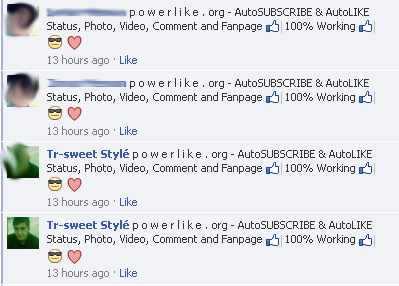
the post about their population will be posted on your groups and pages as well, which is look like this

p o w e r l i k e . org - AutoSUBSCRIBE & AutoLIKE Status, Photo, Video, Comment and Fanpage 100% Working


I think You should understand, through these comments other users motivate to visit powerlike . org (scam) and after there using they will also be targeted users of powerlike. org (scam) site, other users just think that this site is your and you are promoting this, or this site is good and working well therefore your are promoting and helping them, but actually what it is, You know very well. . .


My Last Opinion


Please Dont Use Such Type Of Any Website that says they increase your facebook fan page likes or increase your subscribers, not only p o w e r l i k e . o r g (scam) Any Other Site like this. . .

Believe me there is no any single or any facebook App site that increase your Facebook Fan Page Likes Or Increase Your Profile Subscibers so please do not use them,

Please Feel Free To Comment there in comment box, Let Us know about other scaming sites, and your opinion about powerlike . org


Read More »

Thursday, 13 December 2012

How To Use Youtube In Pakistan Without Using Any Software

6 comments Posted by Imran at 04:43
YouTube is blocked in Pakistan about 3 months ago because of Anti-Islamic Videos - Government requested to Youtube to delete Anti-Islamic Videos But they didn't Listen, Therefore PTA decided to Block Youtube In Pakistan, But the people of Pakistan are not going to decide now what to react Happy for blocked Youtube in Pakistan or Sad because youtube is not only for watching movies or fun, Many other works are only done on Youtube like watching Programming, Courses, Tricks and much more. . .


And for there work they use Alot of softwares like Ultra Surf, Hotspot Shield and other kind of Proxies sites like Bestproxyever.com, Unblock-proxy.net And Alot of other websites are present in google to use Youtube, and the people of Pakistan are using them,

But its so difficult to to use softwares because they load much,

HotSpot Shield is good software for changing IP address or using Youtube but it hotspot shield also allow ads on your browser during browsing any website

Ultra surf is also good but it loads much on pc during using it. . .

So Here I am Going to Show You A new way to browse Youtube or any other website without using any software of proxy site which is also much easy and also not loaded :)


What Is It


Its A Trick to change Ip address of any browser like firefox and chrome, the option is already added in these browsers but not applied or not working without some changing and I am going to show you that process/changing. . .


Procedure


For Firefox


1. First Of All go to Options

2. locate Advanced Tag > Connection > Settings


3. Click on Manual Proxy Configuration:

check Fastest Proxies Online

You can also search Proxies at Google

And Apply Them

And Check Your Ip Address At Ip2loacation.net

Your Are DONE!


For Google Chrome


1. Go go settigns > Settings


2. In Settings Tab > Click On Change Proxy Settings


3. In Proxy Settings > Connections > Settings > Proxy Server > Click on the check box and fill the proxy server address from the the sites given above


And You Are Done

Check Your IP at any website of look at IP2LOCATION.net


Remember


A Ip server may be close or ban any time so dont worry if any proxy doesn't work, just change the IP and Port

Special Thanks


The Special Thankx Are Goes to The Admin Of Engrz.com named As Afaque Memon, He teaches me alot about tricks, and this trick is also teachs me Afaque, he is really a good Man.


Your Turn


Kindly Share this post with your friends because you know
ShArInG i$ CAriNG. Please don't forget to leave your review about any Trick you are going to Use. Leave a comment if you find any dead link i will update the post within 1-2 days thank you.


Read More »

Monday, 10 December 2012

Deep Freeze 7 Full + License Key Free Download Full Version

0 comments Posted by Imran at 01:06
Deep Freeze 7 Full + License Key  is the best computer security application security. Here means the safest most secure from virus attacks. By using Deep Freeze 7 Full + License Key , this signifies that you have just created a computer safe from virus attacks, because the workings of an application made ​​by Faronics is very clever. Latest Software Deep Freeze 7 Full + License Key.Deep Freeze uses a unique method of disk protection to preserve the exact original standard system configuration on over eight million Windows & Macintosh & Linux computers worldwide!


 DeepFreeze STANDARD


Deep Freeze provides bulletproof protection, its non-restrictive approach also improves user productivity and satisfaction. Users are always assured of computers that are consistently operable and available.

DeepFreeze ENTERPRISE


Deep Freeze Enterprise is the most popular version as it provides IT professionals with centralised deployment and flexible management control. The Enterprise Console allows IT Professionals to install, control, and manage Deep Freeze workstations.


 DeepFreeze MAC


Deep Freeze Mac ensures that your Mac OS X computers are consistently operable and available by eradicating all changes on restart. Enterprise level control is optionally available through integration with Apple Remote Desktop (ARD).


 DeepFreezeService STANDARD


Deep Freeze Server instantly protects and preserves original server configurations. It is 100% successful at restoring the server on every restart down to the last byte. Servers are always kept at peak performance because Deep Freeze prevents operating system corruption and hard disk fragmentation, and as a result, software support issues are dramatically reduced.


Features that exist in the Deep Freeze


* Absolute Protection
* Guarantee 100% workstation recovery on restart
* Provides password protection and complete security
* Protects multiple hard drives and partitions


*  Integration and Compatibility
* Supports multi-boot environment
* Compatible with Fast User Switching
* Supports SCSI, ATA, SATA, and IDE hard drives
* Single install for Windows 95, 98, ME, 2000, XP and Vista
* Supports FAT, FAT32, NTFS, basic and dynamic disks, etc.

Download DeepFreeze 7.10 Full Version + License Key


Hopefully
this latest deep freeze Version 7.10 Full Version + License Key (MediaFire Link) could be useful for you all who need them. Please Click The Link Below; Link Is Updated (24-01-13)


Password: itwebister.blogspot.com


Read More »

Wednesday, 5 December 2012

How To Protect Gmail Account Via SMS By Using Gmail Password Recovery Option

0 comments Posted by Imran at 03:37
Hi Friends Today I will Explain About the How To Recover
your Gmail Passwords by using the password recovery 
option in  your gmail account settings.


By Enabling these option you can also recover your
forgotten Gmail password through a SMS.This recovery
method will send a Password-reset code to your mobile
number which you can access.


The following Instructions  will guide you through the
procedure of how to enable your Gmail account to
recover your password through an SMS message.

Follow The Instructions Below For Enabling the Gmail Password Recovery Feature :-


1) Login in to your Gmail Account and Go to Account


2) In The Account Option , Under The Security Option Click On the Change Recovery Options like the Image Below.


3) It  may be asked to Re-enter your password in order to protect your privacy.So Enter the password to verify and gain access into the Recovery Options page.


 4) In the SMS Option Click The Add a Mobile Phone Number.


5) Now Choose Your Country And Your Location. Enter Mobile Number with the Country Code Prefixed To it .


6) Click On the Save Button and Logout From your Gmail Account Now you have done the option Change Recovery
option.


Recover Your Password By Using The Steps Below :- 


1) In the Gmail Login Page Click On the Cant Access Your Account .


2)   Enter the Gmail address for which you want to recover the password 
and once you enter it, click on the Submit button.


3)  You will now be asked to enter the Captcha code displayed on the page thus opened. Enter the Captcha and click on Continue.


4)Then , you have to choose how you want to recover your password for your account. Since we are dealing with recovery of the password through an SMS message, select the optionthat says Get a verification code on my phone. You will be asked to enter your Phone number and the form in which you want to receive the verification code. Select the option Receive via Text message (SMS) and click on the Continue button.


5) And you have Received the Verification Code on your Mobile Phone.Enter the received code as such and click on the Continue button.


6) Now, the Reset Password page will be opened on your screens. In this page, enter a new password twice and click on Reset Password button.


Enjoy The Trick and If You Like This Article Plz Share this Article Using SideBar social Widget and Thank u For the Visiting.


Read More »
 

Popular Posts

© 2011. All Rights Reserved | ITWebister | Template by Blogger Widgets

Home | About | Top ▲