Powered by Blogger.
Showing posts with label Downloads. Show all posts

Tuesday, 27 August 2013

BS Player Letest Version - Free Download Full Version

0 comments Posted by Imran at 14:22
Splayer is one of the most widely used media players, which has been downloaded by more than 70 million people worldwide and it has been translated into more than 90 languages worldwide. It is capable of playing back almost any media file format like AVI, MPEG, ASF, MWA, MP3, WAV, and more. Also, it has very low CPU and RAM requirements.


BSplayer New Features:


Playlists support

The playlists support is great. They may be imported from BST and M3U (Winamp) records, saved, edited and added new files from any folder, as well as URLs.

Display subtitles

Beside the basic functions such as font type and size selection, the program supports many others: shadows, outlines, subtitle location on the screen, etc. Bad subtitle timings can be fixed within the program itself with simple keyboard shortcuts.

BS.MediaLibrary

All multimedia files on your computer's hard drive will now be listed in the BS.MediaLibrary™. From now on they will always be within your reach. MultilingualBS.Player™ is an international product, targeted to all and any user worldwide.

Resolution changing

Use the resolution changing feature and avoid the oversized picture if you wish to watch your movie on your TV screen, projector or plasma screen. The feature will adjust the TV resolution and optimize the quality of movie reproduction.

Fully skinnable

Though the BS.Player™ proudly bears a modern look that sets new standards in this field, developers have included an easy skin selection option and the option of adding your own custom skins. You may create your own dream look or choose from the many pre-prepared ones found at our SKIN section.


Read More »

Wednesday, 26 June 2013

9 Easy-to-Use Professional Video Editing Software

0 comments Posted by Imran at 00:33

There are many free video editing software programs available for download today, but not all of them are good.
Many programs simply don't do what the manufacturers say that they will do, and others don't provide enough - or any support.

Of course, most free software does not include the same level or quality of support that you would expect to find with software that you purchase.

Whether you are working to make a professional videos, or just trying to add awesome effects to your videos. When we talk about Video Editing we can say that almost programs are hard to use and take too much of time to learn, just like Adobe After Effects and Sony Vegas. So in this article you'll find the 5 most popular and Easy-to-Use Video Editing Software to add professional touches to your videos easily.


While you should remember that you get what you pay for, there really is some good free video editing software available. Here are the top five that we have found:

9 Easy-to-Use Professional Video Editing Software


1. Microsoft Movie Maker


Already installed on newer computers that are running Windows XP, Movie Maker has drag and drop features to make creating and editing your movie easier. Microsoft has many add-ons for this software, and upgrades are available through the website. This is one of the best free video editing software programs available.


Download Mocrosoft Movie Maker


2. MAGIX Video Deluxe


A very easy to use software to edit and add awesome visual effects to your videos is MAGIX Video deLuxe, just after installing it and exploring some settings you'll be familiarized with its interface, buttons and timeline usage. You can add multiple video effects, audio, images and videos. It supports a wide range of extensions especially .mov files.

Magix Video Deluxe

3. Apple iMovie


Apple iMovie is comparable to Windows Movie Maker, but Apple iMovie is used on the MAC operating system. Apple iMovie has many advanced features and add-ons. Unfortunately, the software is only free if you buy a new MAC system. If you want the software without buying the system, it is available for purchase. One of the best free video editing programs available for MAC users.

Apple iMovie

4. Ezvid Video Editor


It's true that Ezvid doesn't provide too much of effects to add, but it's the easiest to use. You can easily add Texts with cool fonts and styles, you can also add text slides and add audio streams to your videos. Another perfect option in Ezvid is that you can upload the video to Youtube directly from the program itself with one click.

Ezvid Video Editor


5. Avid FreeDV


Avid FreeDV is available for both Windows and MAC operating systems, and includes basic video and audio editing capabilities, as well as up to two streams of real-time effects. On the whole, a solid video editing program that is slightly hard to use, but very powerful once you learn its ins and outs.

Avid FreeDV


6. Pinnacle Studio


With over 1500 visual effects provided, Pinnacle Studio is a great way to professionally edit your videos in a very easy way. You can also create stunning 3D Stereoscopic videos and energize them with some other effects to make it ready to be a movie. You can also download the iPad version and import/export/edit your movies in a handheld device. The only negative of Pinnacle is price, because Pinnacle studio is a little expensive for normal users.

Pinnacle Studio


7. Muvee Video Maker


Another video maker is Muvee, if you want to make videos for Facebook, Youtube or Vimeo then you can use this software to create High Quality movies by adding some effects and slides. It's very easy to use and beginners can familiarize with its interface easily, and you'll be making fun with your videos.


Muvee Video Maker


8. WeVideo


If you don't like to use the above programs, then you can their alternative Online Video Editor WeVideo. With WeVideo you have access to a large variety of effects, styles, slides, animations and texts that you can add to your videos just after uploading it in the dashboard of WeVideo.

WeVideo


9. Wax


Wax is a high performance and flexible free video editing software program. It
started out as a college project, and has since grown. Wax is good for both
home users and professionals. It can be used as a stand-alone application, or
as a plug-in to other video editors. The software also features unlimited video and audio tracks with top-down compositing.

Wax Video Editor


Read More »

Wednesday, 12 June 2013

How To Protect Registry From Malwares/viruses

0 comments Posted by Imran at 23:14
Internet world is full viruses and it is difficult for an ordinary user to deal with such issues. However, knowing a little bit about this would make your life easier. The Registry of Windows is a sort of internal database that stores all programs configurations and options. Since Windows doesn't prompt users of any new entry added to the Registry, it's easy that some malicious programs can tweak up your registry just to infect your computer (for example by adding a new entry to launch the virus on every Windows startup). To protect your registry from those harmful attacks, you need to monitor unwanted actions imported to the registry on every new program setup, run or modification, to do so by ourselves is almost impossible since the Registry contains millions of entries. In this article I'm going to show you 2 Ways to Protect your Computer from Registry malwares/viruses


1. Monitor Registry Changes Software


registry monitor software


 This software is no doubt a registry monitor but works in a different way, it takes a snapshot (current image of the registry) and starts listening for any new entries and - in realtime - comparing the current registry to the old created snapshot, if a difference is found then it will lists it. Another feature of this software is that you can monitor (listening) on a specific branch (example: HKLM only or HKLM/Software/Microsoft ) what will make it easy to find any suspicious access.

Download Monitor Registry Changes Software


2. Registry Alert


Registry Alert is the best free easy & Reliable Registry monitoring tool, it allows users to protect their computer's sensible database (reg) from different malicious programs. Once installed, it will be running reduced and in stealth mode. Whenever a new program (malicious or not) demands access to registry, the program will prompt you with a Yes or No buttons to allow or not the program to access and modify your registry. If it's a trustworthy program and it was ran by you then simply click Allow to enable registry access.


Download Registry Alert
Read More »

Thursday, 6 June 2013

Download iTunes 11.0.4 (32-bit) Free And Full

0 comments Posted by Imran at 22:04
iTunes V11.0.4 (32-bit)

iTunes is a free application for Mac and PC. It plays all your digital music and video. It syncs content to your iPod, iPhone, and Apple TV. And it's an entertainment superstore that stays open 24/7.

• Organize your music into playlists
• Edit file information
• Record compact discs
•Copy files to an iPod or other digital audio player
•Purchase music and videos on the Internet through the built-in iTunes store
• Run a visualizer to display graphical effects in time to the music
• Encode music into a number of different audio formats.
• This is the 32-bit version.


Specifications


Title: iTunes 11.0.4 (32-bit)
Filename: iTunesSetup.exe
File size: 84.98MB (89,111,376 bytes)
Requirements: Windows XP / Vista / Windows7 / Windows8
Languages: Multiple languages
License: Freeware
Date added: June 6, 2013
Author: Apple Inc

This update fixes a problem that may cause iTunes to quit if you switch between wired and wireless syncing and addresses an issue that may require you to log into the iTunes Store repeatedly.


Read More »

Monday, 6 May 2013

PhotoScape v3.5 Full Download Full Version - Amazing Photo Editing Software

0 comments Posted by Imran at 11:22
Photoscape v3.5
PhotoScape is an all-in-one style photo editor with fun and ease of use. Major capabilities are: viewer, editor, batch editor, page, combine, animated GIF, print, splitter, screen capture, color picker, rename, raw converter, resizing, brightness/color/white-balance adjustment, backlight correction, frames, balloons, text, drawing pictures, cropping, filters, red eye removal and blooming. PhotoScape has been used for two years and is expanding its features continuously.
Photo-scape is a fun and easy photo editing software that enables you to fix and enhance photos.


 Key Features


Viewer: View photos in your folder, create a slideshow
Editor: resizing, brightness and color adjustment, white balance, back light correction, frames,             balloons, mosaic mode, adding text, drawing pictures, cropping, filters, red eye removal, blooming,     paint brush, clone stamp, effect brush
Batch editor: Batch edit multiple photos
    Page: Merge multiple photos on the page frame to create one final photo
Combine: Attach multiple photos vertically or horizontally to create one final photo
Animated GIF: Use multiple photos to create a final animated photo
Print: Print portrait shots, carte de visits(CD V), passport photos
Splitter: Slice a photo into several pieces
Screen Capture: Capture your screenshot and save it
Color Picker: Zoom in on images, search and pick a color
Rename: Change photo file names in batch mode
Raw Converter: Convert RAW to JPG
Paper Print: Print lined, graph, music and calendar paper
Face Search: Find similar faces on the Internet


ScreenShots. . .


Photoscape v3.5

Photoscape v3.5

Photoscape v3.5

Photoscape v3.5


Download


Read More »

Sunday, 21 April 2013

Nokia PC Suite Version 7.1.180.94 Free Download Full Version

0 comments Posted by Imran at 02:35
Latest Version PC Suit 7
Nokia PC Suite is an application designed to enable Nokia phone owners to transfer important files from the mobile phone to the computer and vice versa, but also to control some of the handheld's features straight from the desktop.
The tool is supposed to provide some new functions to those who purchased a Nokia phone, including editing, backing up and synchronizing the files. Nokia PC Suite pretty much does that, as it is an easy to use application with a very pleasant and intuitive interface you should become accustomed with in a matter of minutes.
All functions can be accessed from the main interface, as soon as the phone is successfully connected to the computer. There are four connectivity options available: Bluetooth, infrared, serial cable (CA-42) and USB cable, with the last one being the fastest.


At times, some connection problems may occur while trying to pair the mobile phone and the computer. Also file transfer or other functions of the application could become unavailable. If this occurs, your should disconnect the devices and try to establish a new connection.
The messaging function of Nokia PC Suite comes in quite handy since it allows you to write an SMS message on you computer and send it to someone in the address book. However, note that the message is not automatically transferred to the phone's “Sent” menu.
The synchronization and backup features enable you to keep the important content stored on your Nokia phone safe and ready for a quick restore. You can sync notes, contacts and calendar and thus keep them up to date on both computer and mobile device.
Another very useful function you will find in Nokia PC Suite is the video viewing and conversion. You can use it to turn any movie into the video format supported by your Nokia phone.Bundling a lot of powerful functions that allow you to effortlessly control and manage the content on your mobile phone, Nokia PC Suite offers a pleasant experience overall.


Nokia PC Suite Is A Collection Of Tools That Allows Your Nokia Handset To Connect To Your Windows Machine And Sync Data, Back Up Your Phone's Contents, Push Software Updates To Your Phone, As Well As Share Files Between Desktop And Mobile Phone. Supporting A Long List Of Nokia Phones, Nokia Pc Suite Is Easy To Install And Launch On Your Windows Machine.

The Interface Used By Nokia Pc Suite Is Simple, Using A Set Of Icons To Show Different Tasks. When A Phone Is Connected, It Appears With Its Status In The Left Pane Of The Software; The Right Pane With The Icons For Various Tasks Provides Quick Action. Nokia Pc Suite Lets You Sync Outlook On Your Desktop To Your Phone, And That Capability Works Well. A Neat Capability Is To Dock Your Phone With Your Laptop Or Desktop And Use The Phone As A Modem For Internet Access. In Use, We Found Nokia Pc Suite To Be Friendly, Relatively Fast, And Trouble Free.

If You Have A Supported Nokia Phone (Which Includes Most Models From The Last Few Years), Nokia Pc Suite Is A Useful Add-On To Your Windows Machine. The Ability To Back Up And Update Your Phone Is Handy, And The Integration For Calendars, Contacts, And Music Or Photo Files Is Handy. We Liked Nokia Pc Suite Quite A Lot.

Nokia PC Suite Allows You To Access Your Nokia Phone From Your Computer For A Variety Of Tasks:

  •     Connecting Your Computer To The Internet With The Help Of Your Phone
  •     Updating Phone Software And Applications
  •     Transferring Personal Data Such As Picture Or Video Files Between Your Phone And Your Computer
  •     Synchronizing And Managing Contact And Calendar Entries
  •     Sharing Information With Lotus Notes
  •     Creating Multimedia Message On Your Desktop And Sending Them Through Your Phone

Compatible Devices*


Nokia 2112, Nokia 2115, Nokia 2115i, Nokia 2125, Nokia 2125i, Nokia 2126, Nokia 2126i, Nokia 2128i, Nokia 2270, Nokia 2272, Nokia 2280, Nokia 2285, Nokia 2323 Classic, Nokia 2330 Classic, Nokia 2365i, Nokia 2366i, Nokia 2600 Classic, Nokia 2630, Nokia 2660, Nokia 2680, Nokia 2680 Slide, Nokia 2690, Nokia 2692, Nokia 2700 Classic, Nokia 2710 Navigation Edition, Nokia 2720 Fold, Nokia 2730 Classic, Nokia 2760, Nokia 2855, Nokia 2855i, Nokia 2865, Nokia 2865i, Nokia 3100, Nokia 3105, Nokia 3108, Nokia 3109 Classic, Nokia 3110 Classic, Nokia 3110 Evolve, Nokia 3120, Nokia 3120 Classic, Nokia 3125, Nokia 3152, Nokia 3155, Nokia 3155i, Nokia 3200, Nokia 3205, Nokia 3208c, Nokia 3220, Nokia 3230, Nokia 3250, Nokia 3500 Classic, Nokia 3555, Nokia 3585i, Nokia 3586, Nokia 3586i, Nokia 3587, Nokia 3587i, Nokia 3588, Nokia 3588i, Nokia 3589i, Nokia 3600 Slide, Nokia 3610 Fold, Nokia 3710 Fold, Nokia 3711 Fold, Nokia 3720 Classic, Nokia 5000, Nokia 5070, Nokia 5100, Nokia 5130 XpressMusic, Nokia 5140, Nokia 5140i, Nokia 5200, Nokia 5208, Nokia 5220 XpressMusic, Nokia 5228, Nokia 5230, Nokia 5230 Nuron, Nokia 5230, Nokia 5232, Nokia 5233, Nokia 5235 Comes with Music, Nokia 5250, Nokia 5300 Xpress Music, Nokia 5310 XpressMusic, Nokia 5320 XpressMusic, Nokia 5330, Nokia 5330 Mobile TV Edition, Nokia 5500 Sport, Nokia 5530 XpressMusic, Nokia 5610 XpressMusic, Nokia 5630 XpressMusic, Nokia 5700 XpressMusic, Nokia 5730 XpressMusic, Nokia 5800, Nokia 5800 XpressMusic, Nokia 5800i XpressMusic, Nokia 5802 XpressMusic, Nokia 6011i, Nokia 6012, Nokia 6015, Nokia 6015i, Nokia 6016i, Nokia 6019i, Nokia 6020, Nokia 6021, Nokia 6070, Nokia 6080, Nokia 6085, Nokia 6086, Nokia 6100, Nokia 6101, Nokia 6102, Nokia 6102i, Nokia 6103, Nokia 6108, Nokia 6110 Navigator, Nokia 6111, Nokia 6120 Classic, Nokia 6120ci, Nokia 6121 Classic, Nokia 6122c, Nokia 6124 Classic, Nokia 6125, Nokia 6126, Nokia 6131, Nokia 6131 NFC, Nokia 6133, Nokia 6136, Nokia 6151, Nokia 6152, Nokia 6155, Nokia 6155i, Nokia 6156i, Nokia 6165, Nokia 6165i, Nokia 6170, Nokia 6200, Nokia 6208c, Nokia 6210 Navigator, Nokia 6210 Slide, Nokia 6212 Classic, Nokia 6216 Classic, Nokia 6220, Nokia 6220 Classic, Nokia 6225, Nokia 6230, Nokia 6230i, Nokia 6233, Nokia 6234, Nokia 6235, Nokia 6235i, Nokia 6236i, Nokia 6255, Nokia 6255i, Nokia 6256, Nokia 6256i, Nokia 6260, Nokia 6260 Slide, Nokia 6263, Nokia 6265, Nokia 6265i, Nokia 6267, Nokia 6268, Nokia 6275, Nokia 6275i, Nokia 6280, Nokia 6282, Nokia 6288, Nokia 6290, Nokia 6300, Nokia 6300i, Nokia 6301, Nokia 6303 Classic, Nokia 6303i Classic, Nokia 6350, Nokia 6500 Classic, Nokia 6500 Slide, Nokia 6555, Nokia 6560, Nokia 6585, Nokia 6585i, Nokia 6600 Fold, Nokia 6600 Slide, Nokia 6600i Slide, Nokia 6610, Nokia 6610i, Nokia 6620, Nokia 6630, Nokia 6650, Nokia 6650 Fold, Nokia 6670, Nokia 6680, Nokia 6681, Nokia 6682, Nokia 6700 Classic, Nokia 6700 Slide, Nokia 6702s, Nokia 6710 Navigator, Nokia 6720 Classic, Nokia 6730 Classic, Nokia 6750, Nokia 6760 Slide, Nokia 6788, Nokia 6788i, Nokia 6790 Slide, Nokia 6790 Surge, Nokia 6800, Nokia 6810, Nokia 6820, Nokia 6822, Nokia 7020, Nokia 7100 Supernova, Nokia 7200, Nokia 7210, Nokia 7210 Supernova, Nokia 7230, Nokia 7250, Nokia 7250i, Nokia 7260, Nokia 7270, Nokia 7280, Nokia 7310 Supernova, Nokia 7360, Nokia 7370, Nokia 7373, Nokia 7380, Nokia 7390, Nokia 7500 Prism, Nokia 7510 Supernova, Nokia 7600, Nokia 7610, Nokia 7610 Supernova, Nokia 7710, Nokia 7900 Crystal Prism, Nokia 7900 Prism, Nokia 8600 Luna, Nokia 8800, Nokia 8800 Arte, Nokia 8800 Carbon Arte, Nokia 8800 Gold Arte, Nokia 8800 Sapphire Arte, Nokia 8800 Sirocco Edition, Nokia 8800a, Nokia 8801, Nokia 8910i, Nokia 9300, Nokia 9300i, Nokia 9500 Communicator, Nokia C1-01, Nokia C1-02, Nokia C2-01, Nokia C2-02, Nokia C2-03, Nokia C3-00, Nokia C3-01, Nokia C5-00, Nokia C5-01, Nokia C5-03, Nokia C5-04, Nokia E5-00, Nokia E50, Nokia E51, Nokia E52, Nokia E55, Nokia E60, Nokia E61, Nokia E61i, Nokia E62, Nokia E63, Nokia E65, Nokia E66, Nokia E70, Nokia E71, Nokia E71x, Nokia E72, Nokia E73 Mode, Nokia E75, Nokia E90 Communicator, Nokia N70, Nokia N71, Nokia N72, Nokia N73, Nokia N75, Nokia N76, Nokia N77, Nokia N78, Nokia N79, Nokia N80, Nokia N81, Nokia N81 8GB, Nokia N82, Nokia N85, Nokia N86 8MP, Nokia N90, Nokia N900, Nokia N91, Nokia N92, Nokia N93, Nokia N93i, Nokia N95, Nokia N95 8GB, Nokia N96, Nokia N97, Nokia N97 Mini, Nokia NM705i, Nokia NM706i, Nokia X2-00, Nokia X2-01, Nokia X2-02, Nokia X3-00, Nokia X3-02, Nokia X5-00, Nokia X5-01, Nokia X6-00, Vertu Constellation Quest

* Some Phone Models May Not Be Available In All Countries Or Regions.
Download Nokia PC Suite Version 7.1.180.94 :

Title:Nokia PC Suite 7.1.180.94
Filename:Nokia_PC_Suite_ALL.exe
File size:64.81MB (67,963,216 bytes)
Requirements:Windows XP / Vista / Windows7 / XP64 / Vista64 / Windows7 64 / Windows8 / Windows8 64
Languages:Multiple languages
License:Freeware
Date added:July 4, 2012
Author:Nokia

Download Nokia PC Suite Version 7.1.180.94 : 


Read More »

Sunday, 31 March 2013

What is Dropbox? And How To Use It?

0 comments Posted by Imran at 04:23
Dropbox is a great service that helps you keep your files safe, synced and accessible from anywhere. You can remotely set up Dropbox in just one click with Soluto, for yourself and for your friends, family and colleagues too.

Dropbox is like a regular folder on your computer where you can keep stuff, but has a magical twist – every file that you put in your Dropbox is automatically backed up to the cloud to keep it completely safe and secure.


What is Dropbox?

"Your life's work, wherever you are."

Dropbox is a free service that lets you bring all your photos, docs, and videos anywhere. This means that any file you save to your Dropbox will automatically save to all your computers, phones and even the Dropbox website.

Dropbox also makes it super easy to share with others, whether you're a student or professional, parent or grandparent. Even if you accidentally spill a latte on your laptop, have no fear! You can relax knowing that Dropbox always has you covered, and none of your stuff will ever be lost.

Sign Up Now


Be Anywhere


Dropbox works hard to make sure that all your files are the same no matter where you're working from. This means that you can start working on a computer at school or the office, and finish from your home computer. Never email yourself a file again! Download Dropbox for your phone to simplify your life even more — flip through all your photos or review that spreadsheet even while on the road. Dropbox lets you work from any computer or phone with the confidence that you'll always have everything you need.


Simple Sharing


Dropbox makes sharing so easy that you'll be amazed at the things you can do. Invite your friends, family and teammates to any folder in your Dropbox, and it'll be as if you saved that folder straight to their computers. You can send people links to specific files in your Dropbox too. This makes Dropbox perfect for team projects, sharing party photos with friends, or recording your band's new album.


Always Safe


Even if your computer has a meltdown, your stuff is always safe in Dropbox and can be restored in a snap. Dropbox is like a time machine that lets you undo mistakes and even undelete files you accidentally trash. Your Dropbox is always ready for action from the Dropbox website too!

Once you start putting your files in Dropbox:
  • The files will be backed up and kept safe.
  • You’ll be able to access them from any computer or smartphone.
  • You can easily share stuff with other people.

1. Saving a file to Dropbox


Let’s start with how to save a file to Dropbox.
From now on when you save a document, photo or whatever, you should save it to Dropbox. For example, when you click ‘Save’ in Microsoft Word, you’ll see a list of folders on the left hand side. Select ‘Dropbox’ from the list and press ‘Save’.


2. Adding existing stuff to Dropbox


Now let’s add your existing documents, photos and music.
You can simply drag whichever files you want into your Dropbox folder.
Or, if you don’t like dragging stuff, you can right-click the file you want to move, choose ‘Copy’, go to your Dropbox, right-click and select ‘Paste’.

Dropbox will take care of syncing and storing your stuff. While files are syncing you can keep using the computer however you wish, it all happens in the background. Once you see a green check mark next to the files you put into Dropbox, it means your stuff is backed up and accessible from anywhere.

How to share files


3. Accessing files you put in your Dropbox


From now on you should always view and work on files from your Dropbox. You can easily access the files you’ve put in Dropbox by clicking on the Dropbox icon on your desktop or the Dropbox icon in the system tray (next to the clock).

Once you click on the icon, your Dropbox folder will open up and you’ll be able to access your files just like you do in any other folder on your computer.


How do I share folders with other people?


Dropbox offers easy ways to share files or folders. Shared folders are ideal for groups of people who work on the same files together. When you create a shared folder and add other people to it, its files will appear in their Dropbox just as they do in yours. Any member of the folder can add, delete, or change files within that folder.

  • Share a folder from the Dropbox website
 Share a folder or invite more people to one you've already shared.

  1.     Sign in/sign Up to the Dropbox website.
  2.     Go to your list of files and folders and select the folder you want to share by clicking on the empty space to the right of the folder's name. (Clicking on the folder name or icon will open the folder instead.)
  3.     If the folder is currently unshared, click Invite to folder in the toolbar:

Dropbox invite folder

If the folder is already being shared, click Shared folder options:


Dropbox share folders

4.    Enter the email addresses of the people you want to invite.
5.    Add a personal message if you'd like and click Share folder.

You can also invite people to folders from the Sharing page. To create a new shared folder, click the New shared folder button at the top of the page. To invite more people to an existing shared folder, find it in the list and click its Options link.


Advantages


If your a freelancer or a worker and this your usuall word to do work at your office as well as your home and get your work that you do at your home in USB and put it in your office and copy/paste the work. . . then Dropbox can help you

just install dropbox at your office as well as at your home and enter the same username and password at both places now the all you have to do is to save your documents / files in dropbox it will automatically upload your files in cloud, now whenever you connect your office computer with internet it will automatically download the same files that you save in your home PC.

Dropbox is very popular and usuable in all over the world, its very easy and reliable to use.
So dont wait just

Sign Up Now


Read More »

Saturday, 9 February 2013

3 Ways To Download Youtube Videos Without Java

0 comments Posted by Imran at 23:49
Most of the Video Download websites require Java to be executed to grab the download link, but in some cases you cannot use those Online Services because you don't have Java Installed on you PC or your Browser doesn't support Java ( mobile phones: iPhone...). Here I'm sharing with you 3 Different Ways to Download Youtube Videos with direct link without Java or any 3rd Party Software installation on your PC or Mobile...


1. ClipConverter


ClipConverter is an Online conversion and downloader for Youtube Videos, it doesn't require Java or any 3rd Party pluggins.


ClipConverter 's Features:


  • Convert Videos before download ( MP4, MP3, 3GP, AVI, MPG ...)
  • Download videos from their Hosting Servers (and not Youtube's)
  • Fast Processing video download


How to Download:


Go to ClipConverter.cc and input the URL of Youtube video, choose the Format, then Download


2. YoutubeInMP4 


YoutubeinMP4 is the fastest Youtube Downloader without using Java or any 3rd Party plugins or software...


YoutubeInMP4 's Features:


  • No Java Plugins or Applets
  • Mobile Support (Smartphone, Tablets and Android)
  • Faster Link Accessibility

 How to Download: 


Just add INMP4 before the .COM in a Youtube Link, Example:

http://www.youtubeINMP4.com/watch?v=aQP4xe-hITU


  3. Internet Download Manager 's Video Downloader


IDM 's Video Downloader is an addon compatible with all Browsers that add a small button below every Video in a Web Page.


IDM Video Downloader 's features:


  • Faster Download with IDM High Speed
  • Supports all Web Browsers (Chrome, Firefox, Safari...)
  • Download all Videos in a web page (not only Youtube)


How to Download :


Download IDM Cracked from here, Install it and you'll notice a new button under the video like the screenshot below:


Read More »

Thursday, 24 January 2013

Download Google Chrome 24.0.1312.56 Free And Full Version

0 comments Posted by Imran at 00:07
Google Chrome Latest Version
Google released a new minor update for the stable channel of Chrome browser. The fresh build is 24.0.1312.56 and it is currently available for all supported platforms (Windows, Mac, Linux and Chrome Frame).

It contains a handful of general repairs as well as several security fixes. The developer eliminated the problem that affected vertical scrolling when the mouse wheel would be set to scroll one screen at a time in Windows. Under these settings, the users would experience scrolling one pixel at a time instead of an entire screen.

Also fixed is the problem with clicked links being marked as read when navigating back to the original page.


Features


Google Chrome's features include:

  • Quick to start up
  • Loads web pages in a snap
  • Runs web applications faster than ever
  • Designed for efficiency and ease of use
  • Search and navigate to web pages from the same box
  • Arrange and organize tabs however you wish — quickly and easily
  • Get to your favorite websites with just a click, from the thumbnails of your most visited sites in the New Tab page
  • Themes to add delight to your browser

Google Chrome is a browser that combines a minimal design with sophisticated technology to make the web faster, safer, and easier.


One box for everything


Type in the address bar and get suggestions for both search and web pages.


Thumbnails of your top sites


Access your favorite pages instantly with lightning speed from any new tab.


Incognito mode


Don't want pages you visit to show up in your web history? Choose incognito mode for private browsing.


Safe browsing


Google Chrome warns you if you're about to visit a suspected phishing, malware or otherwise unsafe website.


Download From Here


Read More »

Wednesday, 23 January 2013

Download KMPlayer V3.5.0.77 Free

0 comments Posted by Imran at 23:54
KMPlayer V3.5.0.77

The KMPlayer is a versatile media player which can cover various types of container format such as VCD, DVD, AVI, MKV, Ogg Theora, OGM, 3GP, MPEG-1/2/4, WMV, RealMedia, and QuickTime among others. It handles a wide range of subtitles and allows you to capture audio, video, and screenshots in many ways.

The player provides both internal and external filters with a fully controlled environment in terms of connections to other splitters, decoders, audio/video transform filters and renderers without grappling with the DirectShow merit system. Internal filters are not registered to user's system to keep it from being messed up with system filters.

In December 2008 KMPlayer was bought by Pandora.tv, and continues to be made available as freeware.


The KMPlayer includes almost all the essential decoders required for media playback. Furthermore, to get beyond the limitation of internal decoders, the external ones such as commercial h.264 decoders or cyberlink/intervideo audio decoders can be specified, so that KMP works optimally by the users' own customization. Even though the KMP is based upon directshow structure, it supports Winamp, Realmedia and Quicktime by the internal logic. Thus, it is possible to specify where to try to connect firstly the media in preferences.

In short, the player provides a strong hybrid structure efficient for interconnecting various directshow filters, Winamp input&dsp plugin, and internal filters. The most outstanding feature is that the player has the full control of filter connections to prevent a media playback from being messed.

The player can set multifarious audio and video effects, slow down or increase playback speed with regular tone, select parts of a video as favorites, do an exceptionally powerful A-B repeat, remap the keys of remote interface for HTPC including overlay screen controls, change a skin dynamically depending on a media type playing, and many more. It is completely customizable thanks to a wide selection of skins and color schemes, and the configuration options are extremely extensive.

Intel WIDI For KMPlayerKMP Plus Version 3.2 supports Intel WIDI function which may be used through a dedicated shortcut key and use the WIDI wireless display technology.

What is WIDI?
WIDI is a wireless display technology through a Intel Core 2 Sand Bridge processor that allows you to enjoy a high-definition videos through a TV and/or a projector without any limitations to codecs.


What's New:


  • Added DV file playback support
  • Added support for SIPR Audio Codec
  • Added EVR overlay subtitle function
  • Fixed Playlist window Drag & Drop action bug
  • Fixed JPG file saving bug in storyboard function
  • Fixed playback error with specific types of AVI files
  • Fixed AVI file Audio playback error when seeking
  • Fixed infinite loop playback error with damaged AVI files
  • Fixed DIVX(XSub) subtitle scaling in VMR9 Renderless & EVR C/A
  • Fixed freezing bug when playing specific types of FLV files
  • Fixed Web Search function location bug in fullscreen mode
  • Fixed AlbumArt update error.
  • Fixed bug with seeking to beginning of MKV files

Download From Here


Read More »

Tuesday, 22 January 2013

Download K-Lite Codec Pack 9.70 Full And Free

0 comments Posted by Imran at 09:03
K-Lite Codec Pack 9.70

K-Lite Codec Pack is a software DirectShow, VFW / ACM codecs, and tools. Codecs and DirectShow filters are needed for encoding and decoding audio and video formats. K-Lite Codec Pack is designed as a user-friendly solution for playing all your audio and movie files.

With the K-Lite Codec Pack you can play all the popular audio and video formats and even several less common formats.

K-Lite Codec Pack has a number of major advantages compared to other codec packs:


  • It is updated regularly. So it is always up-to-date with the newest and / or best components.
  • All components have been carefully selected for specific purposes. It's not just a random bunch of stuff thrown together.
  • It is very user-friendly and easy to use.
  • The installation is fully customizable, meaning that you are able to install just those components that you really want.
  • Even beyond the level of adaptability of components. Some components are able to handle multiple formats. You can specify exactly which components should handle format. The pack can be fully tweaked to your own specific needs and preferences.
  • Uninstallation removes everything that was installed by the pack. Including all registry keys.
  • It is very easy to make a fully customized installation cared integrated wizard.
  • It does not contain any bad codec, car or unstable.


Change Log


  • Updated Media Player Classic Home Cinema to version 1.6.6.6584
  • Updated ffdshow to version 1.3.4500
  • Updated LAV Filters to version 0.55.1-13-g00b6435
  • MadVR updated to version 0.85.7
  • Icaros updated to version 2.1.5
  • Updated Codec Tweak Tool to version 5.5.1
  • Win7DSFilterTweaker updated to version 5.7

There are five variants of the K-Lite Codec Pack:


  • The basic variant contains everything you need to play all the common video file formats. Such as AVI, MKV, MP4, OGM, and FLV. This pack is for those who like a small no-nonsense pack.

  • The standard variant contains some additional features compared to the basic variant. It contains Media Player Classic, which is an excellent player for video files. It also has (better) support for playback of DVDs. This pack is recommended for the average user.

  • The full variant has many additional features. It supports playback of several (lossless) audio formats. It contains VFW/ACM codecs that can be used for encoding. It has playback support for a few legacy audio and video formats. This package is suitable for power users.

  • The corporate variant is a special version for use in a corporate environment. It is similar to the full variant, minus a few items, but almost just as powerful. It has a strong focus on open source software.

  • The mega variant has almost the same contents as the full variant, but additionally contains Real Alternative and some extra VFW/ACM codecs.


Read More »

Friday, 18 January 2013

TeamViewer V8.0.16642 - Free Download Latest Version

2 comments Posted by Imran at 10:25

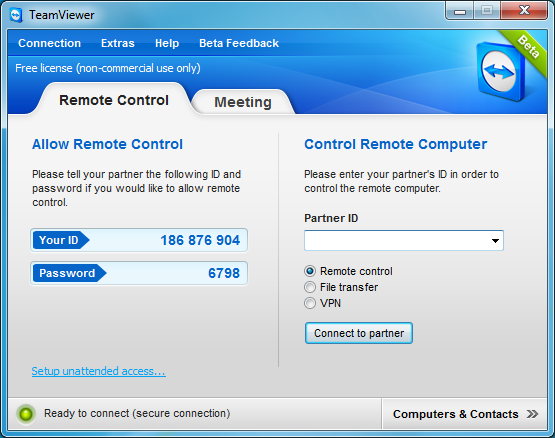
TeamViewer is the All-In-One Solution for Remote Access and Support over the Internet.

TeamViewer connects to any PC or server around the world within a few seconds. You can remote control your partner's PC as if you were sitting right in front of it.

TeamViewer is a remote PC support/control and screen-sharing tool. You can remote
control, desktop sharing dan transfer file yang bekerja di belakang firewall dan NAT proxy.
Certainly there was the time when you needed to access your Home computer from work or from
your friend to get few files But you couldn’t. Then you needed to go Home & get the files,
TeamViewer is made available by the publisher, TeamViewer GmbH.


Features:


  • control computers remotely via the internet,
  • record your session and covert it to AVI,
  • online meetings,
  • Drag & Drop files,
  • Multi-Monitor support.
  • Support, administration & screen-sharing in one package
  • Remote administration of unattended servers
  • File transfer
  • Key exchange & AES (256 Bit) session encoding
  • Remote support without installation
  • Remote presentation of products, 
  • solutions & services
  • Works behind firewallsturns your PC into a business PC, a productive workstation, an entertainment center, game machine, or a scientific computing PC.


TeamViewer for Windows


  • Fixed synchronization issues between TeamViewer Manager and Computers & Contacts
  • Fixed LAN connections from version 8 to version 6 and lower
  • Other minor improvements and fixes


TeamViewer for Mac:


  • Fixed LAN connections from version 8 to version 6 and lower
  • After changing the remote resolution within a session, the original resolution will be restored again
  • Fixed wrong positioning of the mouse cursor
  • Fixed problems during the installation of TeamViewer
  • Various other minor fixes and improvements

System requirements:


  • 30 MB free disk space
  • 300 MHz or faster processor
  • Windows 2000 /Window XP /Window Vista /Window 7 /Window 8

Download


ScreenShots


TeamViewer 8.0.16642

TeamViewer 8.0.16642


Read More »

Thursday, 17 January 2013

Hotspot Shield Elite (ads Free) Full Version Free Download

0 comments Posted by Imran at 06:13
Hotspot Shield Elite is the Application that is able to change your IP Address, your proxy address, but it is not free for ever, Hotspot Shield Elite is for 7 days free (trail) not for ever but here i am going to teach you the way to make it free for ever.
Hotspot Shield Elite is a subscription-based service that allows you not only to secure your connection while surfing WiFi hotspots, but also to access sites not normally available outside of the USA such as Pandora and Hulu. It is the paid version of Hotspot Shield and guarantees faster and more stable streaming

To secure your internet connection, Hotspot Shield Elite creates a Virtual Private Network (a secure connection, usually abbreviated to VPN) between your computer and the Hotspot Shield Elite developer's website, Anchorfree, based in the USA.

Security, Privacy, Access


Hotspot Shield VPN encryption secures your browsing session, detects and blocks malware, protects your privacy and allows you to access all of your favorite sites. Hotspot Shield protects your IP address, and allows you to browse the internet anonymously. Geo-restrictions often deter users from accessing certain sites in some countries. You can bypass geo-restrictions and access blocked sites using the Hotspot Shield VPN software.


Upgrade to Elite


The standard Hotspot Shield version is free, ad-supported VPN software. However, upgrading to Hotspot Shield Elite brings some amazing advantages. The Hotspot Shield Elite Virtual Private Network comes with:

  • Faster Access
  • 24/7 Customer Support
  • Advanced Malware Protection
  • No Ads!

Download From Dropbox:

Link Is Updated (31-03-2013)


How To Download and install :


1) Choose one of the methods from above to download and download zip file.


2) Now go to C:\Windows\System32\drivers\etc and open hosts file with notepad. or editor.


3) Now paste the BELOW code just BELOW the last line of hosts file.


Code:
127.0.0.1 anchorfree.net
127.0.0.1 rss2search.com
127.0.0.1 techbrowsing.com
127.0.0.1 box.anchorfree.net
127.0.0.1 www.mefeedia.com
127.0.0.3 www.anchorfree.net
127.0.0.2 www.mefeedia.com
-----------------------------------------------------

as Show in fig:


4) Now save it by going file> save and then Extract Your Downloaded file using Winrar  by typing password: www.itwebister.blogspot.com

5) Now you will notice i have given two setup file one is in shak 1 folder and the other is in shak 2 folder. Now open folder shak1 and install setup given in it ,, UN CHECK THE OPTION LAUNCH AFTER INSTALLATION , and restart your PC.

6) After restarting without opening previous installed hotspot shield ,, install the setup given in shak2 folder. in other words update it :p . but unchecked the option for LAUNCH AFTER INSTALLATION

7) Now Restart Your PC Again.

8) Last step and very important step ,, just double click and press connect now you are Using hotspot shield elite 2.67 for free :D


Thanks My prayers are with you guys hope you liked my trick and it worked for you if any problem just comment and let me know i am here for you , :)
Read More »
 

Popular Posts

© 2011. All Rights Reserved | ITWebister | Template by Blogger Widgets

Home | About | Top