Powered by Blogger.

Thursday, 30 May 2013

How To Make Google Chrome To Use Less RAM

0 comments Posted by Imran at 05:06
Chrome Uses Less Ram

Most of the people now prefers Google Chrome as the greatest web browser ever released, it's well known with the best performance and simple user interface which makes it easy to use for all kind of people, it takeover more than 50% of the Web Browsers usage in the world. However some of its users might face a serious problem about Huge Memory Consumption from Chrome, it starts draining your computer's available RAM and prevents you from performing any other tasks like gaming. So here are some few tips that will help you reduce Google Chrome's memory leaks.


1. OneTab Extension


OneTab is a great extension that helps Chrome reduce memory usage by closing and regrouping all the opened tabs in one click. Whenever you find that you opened many tabs and you don't need any of them for the moment, just click OneTab from the extension bar and it will close all those tabs to regroup them in a single list for later use. OneTab can help you reduce more than 90% of RAM


Onetab Extension For Chrome


2. Kill Memory Eating Tabs / Extensions


Google Chrome came with a built-in task manager that will help you identifying memory eaters (Tabs and Extensions). It lists all opened and running pages with their memory usage. Pages that uses too much of RAM are pages running many scripts (Javascript...), plugins(Flash, Java...), after identifying them you just kill their tasks. Here's how to do it:


  • Press Shift + Esc (opens Task Manager)
  • Double Click the Memory tab (reorders tasks by memory)
  • Select the pages with High Memory and click End Process


3. TGS Extension


TGS or The Great Suspender is a very important Chrome utility that auto kills idle tabs, what that means? Ok, while using Google Chrome all opened tabs are draining memory even when we don't use them, so that's why we use TGS as it helps us auto killing those non-used tabs (idle) after specified time (5minutes to 60 minutes) which will improve your computer's speed by gaining more memory.
After you install The Great Suspender, Right Click the extension > Options and setup your configuration (whitelist, timeout..)

Read More »

Monday, 6 May 2013

PhotoScape v3.5 Full Download Full Version - Amazing Photo Editing Software

0 comments Posted by Imran at 11:22
Photoscape v3.5
PhotoScape is an all-in-one style photo editor with fun and ease of use. Major capabilities are: viewer, editor, batch editor, page, combine, animated GIF, print, splitter, screen capture, color picker, rename, raw converter, resizing, brightness/color/white-balance adjustment, backlight correction, frames, balloons, text, drawing pictures, cropping, filters, red eye removal and blooming. PhotoScape has been used for two years and is expanding its features continuously.
Photo-scape is a fun and easy photo editing software that enables you to fix and enhance photos.


 Key Features


Viewer: View photos in your folder, create a slideshow
Editor: resizing, brightness and color adjustment, white balance, back light correction, frames,             balloons, mosaic mode, adding text, drawing pictures, cropping, filters, red eye removal, blooming,     paint brush, clone stamp, effect brush
Batch editor: Batch edit multiple photos
    Page: Merge multiple photos on the page frame to create one final photo
Combine: Attach multiple photos vertically or horizontally to create one final photo
Animated GIF: Use multiple photos to create a final animated photo
Print: Print portrait shots, carte de visits(CD V), passport photos
Splitter: Slice a photo into several pieces
Screen Capture: Capture your screenshot and save it
Color Picker: Zoom in on images, search and pick a color
Rename: Change photo file names in batch mode
Raw Converter: Convert RAW to JPG
Paper Print: Print lined, graph, music and calendar paper
Face Search: Find similar faces on the Internet


ScreenShots. . .


Photoscape v3.5

Photoscape v3.5

Photoscape v3.5

Photoscape v3.5


Download


Read More »

Thursday, 2 May 2013

How to Earn Money By Writing Captcha Codes

0 comments Posted by Imran at 01:50
Captcha are the verification words you enter when signing up in any website, those words are to prevent robots from making multiple accounts or gaining multiple access on the platform. We already written an article about How to Bypass Re-Captcha Words , that extension used is from this website which pays users to enter captcha words, then it creates a huge database to use the extension of google chrome and you're able to bypass captcha words. You can earn money from writing captcha codes with this tutorial.
Now I am starting Money Making Tricks This Is my First Trick And Inshahallah i will Post other tricks Of Money Making Online Soon. . .


How it Works?


Writing captcha codes needs a human to be able to solve it, even robots that can bypass Captcha words they are based on humans that have typed it in the past, that's how this trick works. It pays you to write captcha words for them to be able to make a robot that can bypass them easily, and the robot will be paid for users.


How to Earn Money Writing Captcha Codes


1) Go to MegaTypers website

2) Click on Free Signup button to access the registration page.


 3) Enter your Account information: Email, Password, Name...

Note-1: The Payment Method will not be changed later, so select it wisely...

Note-2: The Invitation code is : 6GPB


 4) Check the button that says Important, Enter the verification words from the image and Click Register.


5) After Clicking Register, a new Tutorial page is shown and you can use it to learn some useful menu options. You can also click Skip Tutorial and continue with this guide.


 6) Here's the different parts of the website and their functions:


     6.a) This statistics table is the Payout Rates per 1000 Images: depends on Time of work and Hours of Work, be sure to work on a high payout time.


6.b) The Solve Images tab: here you can solve verification codes and earn money, this method is very slow and you have to wait 15 seconds on every captcha.


 6.c) The Solve Images faster tab: can help you solve images faster with less timeout and waiting times, with realtime payment so you can earn money faster.


6.d) The Profile and Payments tab: is to request payments and other personal info.

   6.e) The Affiliate tab: you can refer friends so that you can earn money while they work 10% of their earnings go to your balance.


7) This is what you need to know to start using MegaTypers and make some extra money in your pocket.

Share This Post With Your Friends And Let Them Know About The Easy Way To Make Money Online


Read More »

Saturday, 27 April 2013

How To Type Faster? 5 Websites To Learn To Type Faster

0 comments Posted by Imran at 01:10
Living in the digital world where typing is necessary for every person, Learning the way of proper usage of keyboard is necessary for every person, A person should be more productive and get thinks done quicker with a keyboard, typing faster can enable you to keep up with your brain.
In this article, we’ll give you Some tips to get you started typing faster and proper and also introduce you some websites that may help you to improve your typing. Some of the tips are quite obvious ones, but we’ll provide you with a few apps to help you practice and learn faster.


Get Rid Of Bad Habids


Getting rid of your bad typing habits is probably the hardest thing to do. You’ve probably been using the same typing method since you started using a keyboard, right down to where you place your palms. If you’re an FPS (First Person Shooter) gamer you’re probably used to placing your left hand on the WASD keys, and may have stronger fingers on your left hand than your right (speaking from experience here).
Others may type only with two fingers, hovering over ten (or more) keys each, always having to keep their eyes on the keyboard to get the right keys. Although you might be typing fast with only half of the needed fingers, you have to put down your foot (or your hands) and break that habit immediately.


Use All 10 Fingers


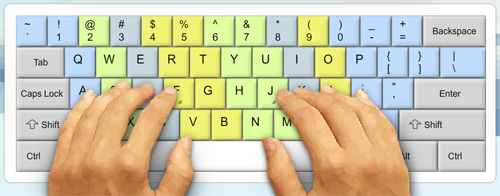
 he next step is to relearn the correct finger placement on the keyboard. If you take a closer look at your keyboard, you’ll notice raised bumps on each of the F key and J key. This is to help you find the correct finger placement without having to look at the keyboard.
Ideally, your index fingers should rest on the F and J keys and the other fingers will fall into place naturally.
In the picture below, you’ll notice color-coded areas showing the keys covered by each finger. You’ll notice that the middle fingers and ring fingers are used for only a few keys on the keyboard, while your index fingers cover the middle section of the keyboard. Navigational, punctuation and function keys are controlled mostly by the little finger.
If this confuses you, head over to websites like the TypingClub or Typing Web where they take you through each step to familiarize yourself with the keyboard. Some of their exercises only involve 2 fingers and as you go through their program, you’ll slowly master the way of faster and proper keyboard typing.


Type Without Looking At Keyboard


 Next up: Touch typing. It’s when you type without having to look at the keyboard. In fact, for seasoned typists, looking at the keyboard actually slows them down.

To get there takes practice, and we’re not talking about hours here. It could be weeks before you condition your fingers to take control of the keys ‘they’ are responsible for. Even if it slows you down, do not revert to how you used to type.

Now, try typing sentences without looking at the keyboard, and try to remember the position of each letter. If you have to sneak a peek at the keyboard, you can, but give the same word or sentence another run, this time without looking at the keyboard. It takes a while but if you are determined, it gets easier every day.

Eventually, you will know where each key is and from then on, it’s just a matter of picking up in terms of speed.


Navigate With Basic Keyboard Shortcuts


It’s no surprise why Windows and Mac OS have many keyboard shortcuts. Since both your hands are already on the keyboard, why spend time using a mouse to navigate? You don’t have to remember every shortcut, just the more common ones.
Common shortcuts below are mostly used in word processing programs:

ShortcutsDescriptions
Ctrl + CCopy
Ctrl + XCut
Ctrl + VPaste
Ctrl + ZUndo
Ctrl + SSave
Ctrl + FSearch for word
Ctrl + AHighlight everything
Shift + Left Arrow or Right ArrowHightlight next letter
Ctrl + Shift + Left Arrow or Right ArrowHighlight next word
Ctrl + Left Arrow or Right ArrowNavigate text cursor to next word without highlight
HomeGo to beginning of line
EndGo to end of line
Page upScroll up
Page DownScroll down
You can also use shortcut keys while browsing the web. Here are some shortcuts you could use to navigate in web browsers.

ShortcutsDescriptions
Ctrl + TabSwitch to next tab
Ctrl + Shift + TabSwitch to previous tab
Ctrl + TOpen new tab
Ctrl + WClose current tab
Ctrl + Shift + TOpen previously closed tab
Ctrl + Rrefresh current webpage
Ctrl + NOpen new web browser window
BackspaceGo back one page
Shift + BackspaceGo forward one page
Finally, here are some common keyboard shortcuts for more general (Windows) navigation.

ShortcutsDescriptions
Alt + TabSwitch to next opened window
Alt + Shift + TabSwitch to previous opened window
Alt + F4Close current window
Using these shortcut keys will require the little finger a lot as many of the modifier keys like Ctrl, Alt and Shift are closest to your little finger.


Practise With Apps


Here's a list of top 5 websites and apps to help you learn typing more faster and achieve long texts in less time.

 1. Keybr.Com


 Keybr is a flash website that helps you typing words to paragraphs with many languages. Many lessons are introduced in Keybr to give more difficulty to levels with more new extra keys like numbers, ponctuations, spaces and others. Also with Keybr you are allowed to import external text source such as a website or document and type it in the Keybr platform, so you can learn to type your own words more easily. You can also test your testing speed measured by Words per Minute (wpm) as well as seeing your personal reports for mistakes you did in lessons.


Keybr Website


2. TypeRacer


 TypeRacer is a funny genre to learn typing faster while racing others with your highest typing speed that you can make. With TypeRacer you can race other people typing words and see your competition compared to other typers. You can also start a race with your friends by sharing a personal link about your competition, and after your friends join you can start beating them. In TypeRacer you have also the opportunity to improve your typing skills with a Practice mode that will help you start typing as a beginner to an expert. TypeRacer have a Top Score leaderboard scores that you can try to beat with your hands typing words.


TypeRacer Website


3. TypeOnline


 TypeOnline is a good online typing platform that will help you solve your problems about achieving long texts at work. With TypeOnline you can start as beginner and make your way to be a super faster keyboard writer with leveled lessons.

Type Online Website


4. WordGames


 Last but not least, WordGames is an another funny typing platform that contains many games to learn typing with different styles. At WordGames you can have fun while learning in a very easy way, most of the games are leveled with different difficulty and extra keys: the more the difficulty, the more the keys used...


WordGames Typing Website


5. Typing Maniac


Typing Maniac is a Facebook game that will get you addicted as you can compete with friends to see who can earn the most points. As words appear on your screen, type them out to make them go away before too many land on the ground and cause you to lose the game! Earn points and get a better score if you achieve each level without missing or misspelling a word.

Typing Maniac Website


Conclusion


With the above 5 Websites that you read about you can easily be a super fast keyboard typer and you can write while looking at the screen ( no longer looking at the keyboard while writing ), thus you can use it in texting, chatting, writing long texts for your homework or work...

Also share this article with your friends and let them know the tricks to speed up their typing - Thank you


Read More »

Monday, 22 April 2013

How To Use Youtube With Your Own IP Using Google DNS

0 comments Posted by Imran at 03:55
Using Google Dns you can use youtube in Pakistan or anywhere if youtube is blocked in your country. . .
If you use Google's Public DNS server or OpenDNS as your DNS server, you may notice starting today that YouTube videos load faster and other web content comes in quicker. If you're using your ISP's DNS server as the default, now's a good time to try Google's or OpenDNS.

The reason behind the speed bump is that OpenDNS and Google are working with Content Delivery Networks (CDNs) to attach location data to the DNS requests, so when you request a web page, it will go to a server near you rather than, as previously mentioned possibly a server that's not closest to you.


Also Check Other Methods

3 Ways To Download Youtube Videos Without Java

Use Youtube In Pakistan With High Anonymity Online using Web-freer

How To Use Youtube In Pakistan Without Using Any Software?

How to Access/Unblock Youtube Website in Pakistan?

Use Youtube In Pakistan Using Hotspot Sheild (without Ads)


this is my own method which i have discovered few days ago. This method will allow you to open and watch youtube video without any proxy and vpn .

Method To Use Youtube Without Any Software, Proxy and VPN


1. Open Control Panel


2. Go To Network Connections

3. Right Click On Local Area Connection


4. In General tab drop down the mouse and double Click on Internet Protocol (TCP/IP)

5. Now on general tab click on Use the following DNS server addresses:

And fill preferred DNS server:        8.8.8.8
Alternate DNS server:                    8.8.4.4


6. Click On OK and You Are Done. . .

7. Now Open Youtube With HTTPS =>> https://www.youtube.com


Your Turn:


Please write a comment to show us your feeling about this tutorial and also share this with your friends as you know Sharing Is Caring
Read More »

Sunday, 21 April 2013

Nokia PC Suite Version 7.1.180.94 Free Download Full Version

0 comments Posted by Imran at 02:35
Latest Version PC Suit 7
Nokia PC Suite is an application designed to enable Nokia phone owners to transfer important files from the mobile phone to the computer and vice versa, but also to control some of the handheld's features straight from the desktop.
The tool is supposed to provide some new functions to those who purchased a Nokia phone, including editing, backing up and synchronizing the files. Nokia PC Suite pretty much does that, as it is an easy to use application with a very pleasant and intuitive interface you should become accustomed with in a matter of minutes.
All functions can be accessed from the main interface, as soon as the phone is successfully connected to the computer. There are four connectivity options available: Bluetooth, infrared, serial cable (CA-42) and USB cable, with the last one being the fastest.


At times, some connection problems may occur while trying to pair the mobile phone and the computer. Also file transfer or other functions of the application could become unavailable. If this occurs, your should disconnect the devices and try to establish a new connection.
The messaging function of Nokia PC Suite comes in quite handy since it allows you to write an SMS message on you computer and send it to someone in the address book. However, note that the message is not automatically transferred to the phone's “Sent” menu.
The synchronization and backup features enable you to keep the important content stored on your Nokia phone safe and ready for a quick restore. You can sync notes, contacts and calendar and thus keep them up to date on both computer and mobile device.
Another very useful function you will find in Nokia PC Suite is the video viewing and conversion. You can use it to turn any movie into the video format supported by your Nokia phone.Bundling a lot of powerful functions that allow you to effortlessly control and manage the content on your mobile phone, Nokia PC Suite offers a pleasant experience overall.


Nokia PC Suite Is A Collection Of Tools That Allows Your Nokia Handset To Connect To Your Windows Machine And Sync Data, Back Up Your Phone's Contents, Push Software Updates To Your Phone, As Well As Share Files Between Desktop And Mobile Phone. Supporting A Long List Of Nokia Phones, Nokia Pc Suite Is Easy To Install And Launch On Your Windows Machine.

The Interface Used By Nokia Pc Suite Is Simple, Using A Set Of Icons To Show Different Tasks. When A Phone Is Connected, It Appears With Its Status In The Left Pane Of The Software; The Right Pane With The Icons For Various Tasks Provides Quick Action. Nokia Pc Suite Lets You Sync Outlook On Your Desktop To Your Phone, And That Capability Works Well. A Neat Capability Is To Dock Your Phone With Your Laptop Or Desktop And Use The Phone As A Modem For Internet Access. In Use, We Found Nokia Pc Suite To Be Friendly, Relatively Fast, And Trouble Free.

If You Have A Supported Nokia Phone (Which Includes Most Models From The Last Few Years), Nokia Pc Suite Is A Useful Add-On To Your Windows Machine. The Ability To Back Up And Update Your Phone Is Handy, And The Integration For Calendars, Contacts, And Music Or Photo Files Is Handy. We Liked Nokia Pc Suite Quite A Lot.

Nokia PC Suite Allows You To Access Your Nokia Phone From Your Computer For A Variety Of Tasks:

  •     Connecting Your Computer To The Internet With The Help Of Your Phone
  •     Updating Phone Software And Applications
  •     Transferring Personal Data Such As Picture Or Video Files Between Your Phone And Your Computer
  •     Synchronizing And Managing Contact And Calendar Entries
  •     Sharing Information With Lotus Notes
  •     Creating Multimedia Message On Your Desktop And Sending Them Through Your Phone

Compatible Devices*


Nokia 2112, Nokia 2115, Nokia 2115i, Nokia 2125, Nokia 2125i, Nokia 2126, Nokia 2126i, Nokia 2128i, Nokia 2270, Nokia 2272, Nokia 2280, Nokia 2285, Nokia 2323 Classic, Nokia 2330 Classic, Nokia 2365i, Nokia 2366i, Nokia 2600 Classic, Nokia 2630, Nokia 2660, Nokia 2680, Nokia 2680 Slide, Nokia 2690, Nokia 2692, Nokia 2700 Classic, Nokia 2710 Navigation Edition, Nokia 2720 Fold, Nokia 2730 Classic, Nokia 2760, Nokia 2855, Nokia 2855i, Nokia 2865, Nokia 2865i, Nokia 3100, Nokia 3105, Nokia 3108, Nokia 3109 Classic, Nokia 3110 Classic, Nokia 3110 Evolve, Nokia 3120, Nokia 3120 Classic, Nokia 3125, Nokia 3152, Nokia 3155, Nokia 3155i, Nokia 3200, Nokia 3205, Nokia 3208c, Nokia 3220, Nokia 3230, Nokia 3250, Nokia 3500 Classic, Nokia 3555, Nokia 3585i, Nokia 3586, Nokia 3586i, Nokia 3587, Nokia 3587i, Nokia 3588, Nokia 3588i, Nokia 3589i, Nokia 3600 Slide, Nokia 3610 Fold, Nokia 3710 Fold, Nokia 3711 Fold, Nokia 3720 Classic, Nokia 5000, Nokia 5070, Nokia 5100, Nokia 5130 XpressMusic, Nokia 5140, Nokia 5140i, Nokia 5200, Nokia 5208, Nokia 5220 XpressMusic, Nokia 5228, Nokia 5230, Nokia 5230 Nuron, Nokia 5230, Nokia 5232, Nokia 5233, Nokia 5235 Comes with Music, Nokia 5250, Nokia 5300 Xpress Music, Nokia 5310 XpressMusic, Nokia 5320 XpressMusic, Nokia 5330, Nokia 5330 Mobile TV Edition, Nokia 5500 Sport, Nokia 5530 XpressMusic, Nokia 5610 XpressMusic, Nokia 5630 XpressMusic, Nokia 5700 XpressMusic, Nokia 5730 XpressMusic, Nokia 5800, Nokia 5800 XpressMusic, Nokia 5800i XpressMusic, Nokia 5802 XpressMusic, Nokia 6011i, Nokia 6012, Nokia 6015, Nokia 6015i, Nokia 6016i, Nokia 6019i, Nokia 6020, Nokia 6021, Nokia 6070, Nokia 6080, Nokia 6085, Nokia 6086, Nokia 6100, Nokia 6101, Nokia 6102, Nokia 6102i, Nokia 6103, Nokia 6108, Nokia 6110 Navigator, Nokia 6111, Nokia 6120 Classic, Nokia 6120ci, Nokia 6121 Classic, Nokia 6122c, Nokia 6124 Classic, Nokia 6125, Nokia 6126, Nokia 6131, Nokia 6131 NFC, Nokia 6133, Nokia 6136, Nokia 6151, Nokia 6152, Nokia 6155, Nokia 6155i, Nokia 6156i, Nokia 6165, Nokia 6165i, Nokia 6170, Nokia 6200, Nokia 6208c, Nokia 6210 Navigator, Nokia 6210 Slide, Nokia 6212 Classic, Nokia 6216 Classic, Nokia 6220, Nokia 6220 Classic, Nokia 6225, Nokia 6230, Nokia 6230i, Nokia 6233, Nokia 6234, Nokia 6235, Nokia 6235i, Nokia 6236i, Nokia 6255, Nokia 6255i, Nokia 6256, Nokia 6256i, Nokia 6260, Nokia 6260 Slide, Nokia 6263, Nokia 6265, Nokia 6265i, Nokia 6267, Nokia 6268, Nokia 6275, Nokia 6275i, Nokia 6280, Nokia 6282, Nokia 6288, Nokia 6290, Nokia 6300, Nokia 6300i, Nokia 6301, Nokia 6303 Classic, Nokia 6303i Classic, Nokia 6350, Nokia 6500 Classic, Nokia 6500 Slide, Nokia 6555, Nokia 6560, Nokia 6585, Nokia 6585i, Nokia 6600 Fold, Nokia 6600 Slide, Nokia 6600i Slide, Nokia 6610, Nokia 6610i, Nokia 6620, Nokia 6630, Nokia 6650, Nokia 6650 Fold, Nokia 6670, Nokia 6680, Nokia 6681, Nokia 6682, Nokia 6700 Classic, Nokia 6700 Slide, Nokia 6702s, Nokia 6710 Navigator, Nokia 6720 Classic, Nokia 6730 Classic, Nokia 6750, Nokia 6760 Slide, Nokia 6788, Nokia 6788i, Nokia 6790 Slide, Nokia 6790 Surge, Nokia 6800, Nokia 6810, Nokia 6820, Nokia 6822, Nokia 7020, Nokia 7100 Supernova, Nokia 7200, Nokia 7210, Nokia 7210 Supernova, Nokia 7230, Nokia 7250, Nokia 7250i, Nokia 7260, Nokia 7270, Nokia 7280, Nokia 7310 Supernova, Nokia 7360, Nokia 7370, Nokia 7373, Nokia 7380, Nokia 7390, Nokia 7500 Prism, Nokia 7510 Supernova, Nokia 7600, Nokia 7610, Nokia 7610 Supernova, Nokia 7710, Nokia 7900 Crystal Prism, Nokia 7900 Prism, Nokia 8600 Luna, Nokia 8800, Nokia 8800 Arte, Nokia 8800 Carbon Arte, Nokia 8800 Gold Arte, Nokia 8800 Sapphire Arte, Nokia 8800 Sirocco Edition, Nokia 8800a, Nokia 8801, Nokia 8910i, Nokia 9300, Nokia 9300i, Nokia 9500 Communicator, Nokia C1-01, Nokia C1-02, Nokia C2-01, Nokia C2-02, Nokia C2-03, Nokia C3-00, Nokia C3-01, Nokia C5-00, Nokia C5-01, Nokia C5-03, Nokia C5-04, Nokia E5-00, Nokia E50, Nokia E51, Nokia E52, Nokia E55, Nokia E60, Nokia E61, Nokia E61i, Nokia E62, Nokia E63, Nokia E65, Nokia E66, Nokia E70, Nokia E71, Nokia E71x, Nokia E72, Nokia E73 Mode, Nokia E75, Nokia E90 Communicator, Nokia N70, Nokia N71, Nokia N72, Nokia N73, Nokia N75, Nokia N76, Nokia N77, Nokia N78, Nokia N79, Nokia N80, Nokia N81, Nokia N81 8GB, Nokia N82, Nokia N85, Nokia N86 8MP, Nokia N90, Nokia N900, Nokia N91, Nokia N92, Nokia N93, Nokia N93i, Nokia N95, Nokia N95 8GB, Nokia N96, Nokia N97, Nokia N97 Mini, Nokia NM705i, Nokia NM706i, Nokia X2-00, Nokia X2-01, Nokia X2-02, Nokia X3-00, Nokia X3-02, Nokia X5-00, Nokia X5-01, Nokia X6-00, Vertu Constellation Quest

* Some Phone Models May Not Be Available In All Countries Or Regions.
Download Nokia PC Suite Version 7.1.180.94 :

Title:Nokia PC Suite 7.1.180.94
Filename:Nokia_PC_Suite_ALL.exe
File size:64.81MB (67,963,216 bytes)
Requirements:Windows XP / Vista / Windows7 / XP64 / Vista64 / Windows7 64 / Windows8 / Windows8 64
Languages:Multiple languages
License:Freeware
Date added:July 4, 2012
Author:Nokia

Download Nokia PC Suite Version 7.1.180.94 : 


Read More »

Tuesday, 9 April 2013

What Is Alexa Rank And What Are Its Benefits?

0 comments Posted by Imran at 00:31
In addition to google page rank, Alexa rank is one factor to make money on the internet. So if you're serious about making money on the internet then you must know Alexa rank.

What is Alexa rank? Alexa rank is a tool created by Alexa.com to analyze how much traffic or page views of a website are there it is based on the number of visitors who visit his website and the other method is to install the Alexa toolbar on their browser whenever the user install the alexa toolbar it automatically detect that which website is most visited by the user who istalled the toolbar. After that, the data will be collected and then ranked based on the traffic. The greater the traffic the smaller will be its rank. So how to find our website Alexa ranking? check it out.
Remember the smaller the rank the popular your website is. . .


There are 2 ways through which you can use to find your website's alexa rank, namely:

 I. Install Our Alexa widget on your blog that looks like this way of installation:

1. Click Here for downloading our alexa widget.
it will look like this. . .


2. click on Install Toolbar


3. A new Pop-Up window Will Appear that ask's you about their privacy policy, just click on Accept and Install


4. It will ask you to Install plugin - simply click On allow. . .

5. And You Are Done!. . .


This plugin shows you
  • The search engine to search something from ITWebister
  • The rss update through which you may know about the latest update.
  • Labels of our blog
and the main think
  • It shows the rank of all websites that you open just mouse over the "a" symbol (alexa symbol) at the right of the toolbar it automatically show you the rank of that website. . .
and this toolbar is so fast working - mean it will not effect your browsing speed so go on. . .

Then what good alexa rank for your blog?


 If your blog is used to make money on the internet then alexa rank is very important to you. Because many dollars producing programs on the internet such as TLA , SponsoredReviews , Blogsvertise etc.

which require alexa rank to join. So the smaller the alexa ranking of your blog more and more programs you can follow, which means greater your chance to make money on the internet. In addition, Alexa rank can also be used to determine whether The blog is popular or not.

I hope you understand the value of alexa on the internet and its popularity that why it so so necessary for blog or any website please give your reviews about this article and your alexa rank and also share this article with your friends using our social sharing widget below the title. . .
Read More »
 

Popular Posts

© 2011. All Rights Reserved | ITWebister | Template by Blogger Widgets

Home | About | Top